

In 2024, Google will phase out 3rd-party cookies in their Chrome browser. At our recent DataChat Live! webinar covering this topic, many website owners had questions about how this impacts them. Here are ObservePoint’s answers to your burning 3rd-party cookie questions:
Who will be affected by Chrome’s 3rd-party cookie phase-out?
When Chrome phases out 3rd-party cookies, any website that uses 3rd-party cookies will be affected, but the degree will vary by the use case. In the worst-case scenario, user-facing functionality will break. However, this is rare in our experience. In the most common scenario, metrics will be wrong (example: analytics that require 3rd-party cookies will consider all users as new visitors, even if they are returning), or experience quality will degrade (example: ad platforms will have incomplete profile information about users, resulting in lower relevance ads and lower conversion rates).
How do other browsers currently treat 3rd-party cookies?
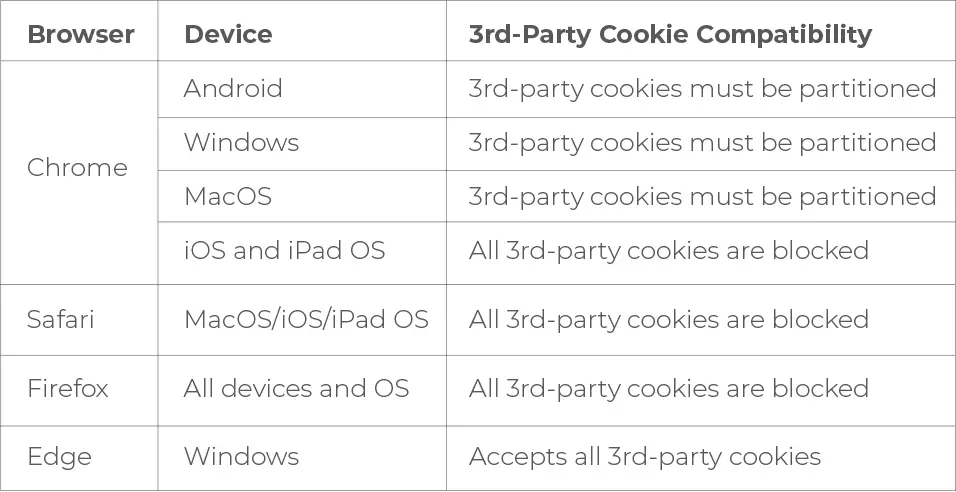
Apple’s Safari browser has been rejecting 3rd-party cookies since 2017. Apple’s browser team has officially rejected the Topics API for Safari (source). We don’t expect Apple to change direction in the foreseeable future. Also, note that all iOS browsers are powered by Safari, even if they are branded as other browsers. Microsoft’s Edge browser is powered by the same underlying code that powers Google’s Chrome. However, Edge currently allows 3rd-party cookies (source), and Microsoft has not announced any plans to phase out 3rd-party cookies. Edge has disabled the Topics API (despite having the code from Google available to them), and Microsoft has not commented on whether they will enable the Topics API for Edge in the future.
What is a Partitioned cookie, and how do we use it?
A Partitioned 3rd-party cookie (sometimes called a “CHIPS” cookie) is simply our familiar 3rd-party cookie but with an additional compartmentalization, so that it can only be used by one website. In other words, it’s a 3rd-party cookie that cannot be used for cross-site tracking. Adopting Partitioned cookies is straightforward for vendors (they simply add one flag when they set the cookie). Partitioned cookies are a great way for vendors to work around 3rd-party cookie deprecation, if their use cases don’t actually need cross-site tracking.
Do Partitioned 3rd-party cookies work on each browser?
The following table shows how browsers handle 3rd party cookies and partitioned cookies:
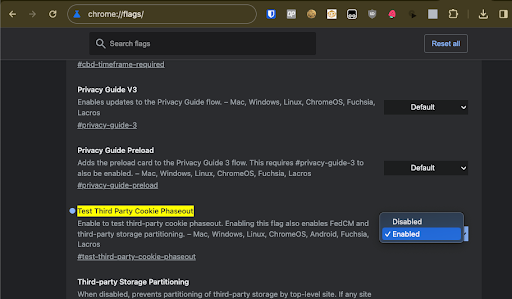
- Go to special address chrome://flags/#test-third-party-cookie-phaseout
- Change the setting “Test Third Party Cookie Phaseout” to “Enabled”
- A banner appears on the bottom of the screen.
- Click “Relaunch”
- When Chrome relaunches, you will see a banner indicating that you are participating in the 3rd-party cookie phase-out trial.
What use cases do I need to test on my website?
There are two categories of use cases we recommend testing, which require different kinds of partnerships with your vendors. The kind of testing you perform will depend on your specific needs. Category 1: Use cases that use 3rd-party cookies but don’t need cross-site tracking Examples of this use case include support chat features, analytics, and consent managers. You’ll want to audit your site for 3rd-party cookies. Each of these cookies will be blocked by Chrome when 3rd-party cookies phase out. However, if they are flagged as “Partitioned” (i.e., they have non-empty “Partition Key”), Chrome will accept them even after the 3rd-party phase-out. We recommend working with your vendors to identify any 3rd-party non-partitioned cookies and encourage them to (1) redesign their use cases to use 1st-party cookies (or no cookies) or (2) mark their 3rd-party cookies as “Partitioned” (usually the easiest option but reduces their ability to track users across sites). Category 2: Use cases that use 3rd-party cookies for cross-site tracking Examples of this use case include cross-domain analytics and ad networks. Similar to category 1, you start by auditing your site for 3rd-party cookies. You cannot use “Partitioned” cookies for this use case like you can for category 1 use cases. You have a few other options:
- For ad networks, adopt Chrome’s Topics API
- For other use cases, you have options:
- Ask your users to explicitly log in either via your own login system or an SSO vendor. Many sites have adopted Google SSO for this purpose. In fact, it’s becoming more common for sites to pop up a Google sign-in menu for users for this very purpose.
- Ask Google to enroll your sites as a Related Website Set. If Google grants your request, Chrome will allow these sites to set 3rd-party cookies that can be used by each other.
Will ObservePoint be able to report the new technologies that replace cookies?
Yes. ObservePoint plans to report information about the topics that Chrome categorizes for customer websites, Partitioned cookies, and any other technologies that website owners find valuable in this new world. Expect reporting on Partition information for all cookies in the next 1-2 months. To see how ObservePoint can help you audit your 3rd-party cookies automatically and at scale, sign up for a Free Trial now.