Freshly Minted: ObservePoint Product Roundup
 March 25, 2026



With analysts estimating that over 80% of the global population is now covered by modern data privacy regulations, the compliance landscape is getting more complex by the minute. Between this shifting patchwork of global laws and emerging U.S. state regulations, managing your website’s privacy compliance can feel like navigating a blizzard. At ObservePoint, we are constantly looking for ways to simplify your day-to-day.
Welcome to our latest roundup of new releases designed to cut through the noise, supercharge your workflow, and shave hours off your audits.
Product Releases
REPORT ENHANCEMENTS
Continuous improvements make world-class reports.
What It Is
Improved Sorting and Filtering:
- Multi-column Sort: Sort and analyze data using multiple criteria to quickly surface what matters most. Less time rubbing your temples in frustration, more time finding valuable insights.
- Filter Search Flattened: With a streamlined filter search experience, you can now quickly find the columns you want to filter without navigating nested menus.
- ALL/ANY Filter Bar Operator: With improved visibility of the ALL/ANY operator, you can more easily control and refine your filter logic.
- Sort by Logic: Address the most pressing issues first by sorting by logical order like severity, including critical, serious, moderate, and low.
Enhanced Reports Home Page Visibility and Sharing:
- Report Sharing Status Column: A new column indicates if a report has been shared.
- Default Team Reports: All reports are now visible to your colleagues by default (you can still make reports visible only to you).
New Export and Data Access Options:
- New In-App Export Types: More export options are available directly within the application: Excel, CSV, and TSV.
- Pages Missing Tags: Find all pages across all of your websites that are missing a specific tag, your analytics tag, for example.
- Folder Creator Column: For audit and journey run reports, a new column shows the folder creator.
Interface and Terminology Updates:
- Journey Status Colors: In a Journey report, the Web Journey Status column now appears in red, yellow, and green for better visual cues.
- Renamed Min/Max to Oldest/Newest: Date aggregations now say “Oldest” and “Newest” for clarity.
- Retitled Accessibility Columns: Accessibility columns have been renamed for improved understanding.
- Simplified New Reports: When you click “Create New Reports,” you’ll see only the most essential columns, making it easier to get started.
Why You’ll Like It
ALT: Navigate reports more efficiently with improved sorting and filtering, easier-to-understand interfaces, default sharing, and a powerful new missing tag view across your entire digital ecosystem.
AGGREGATION ROW
See column stats at the top of your reports.
What It Is
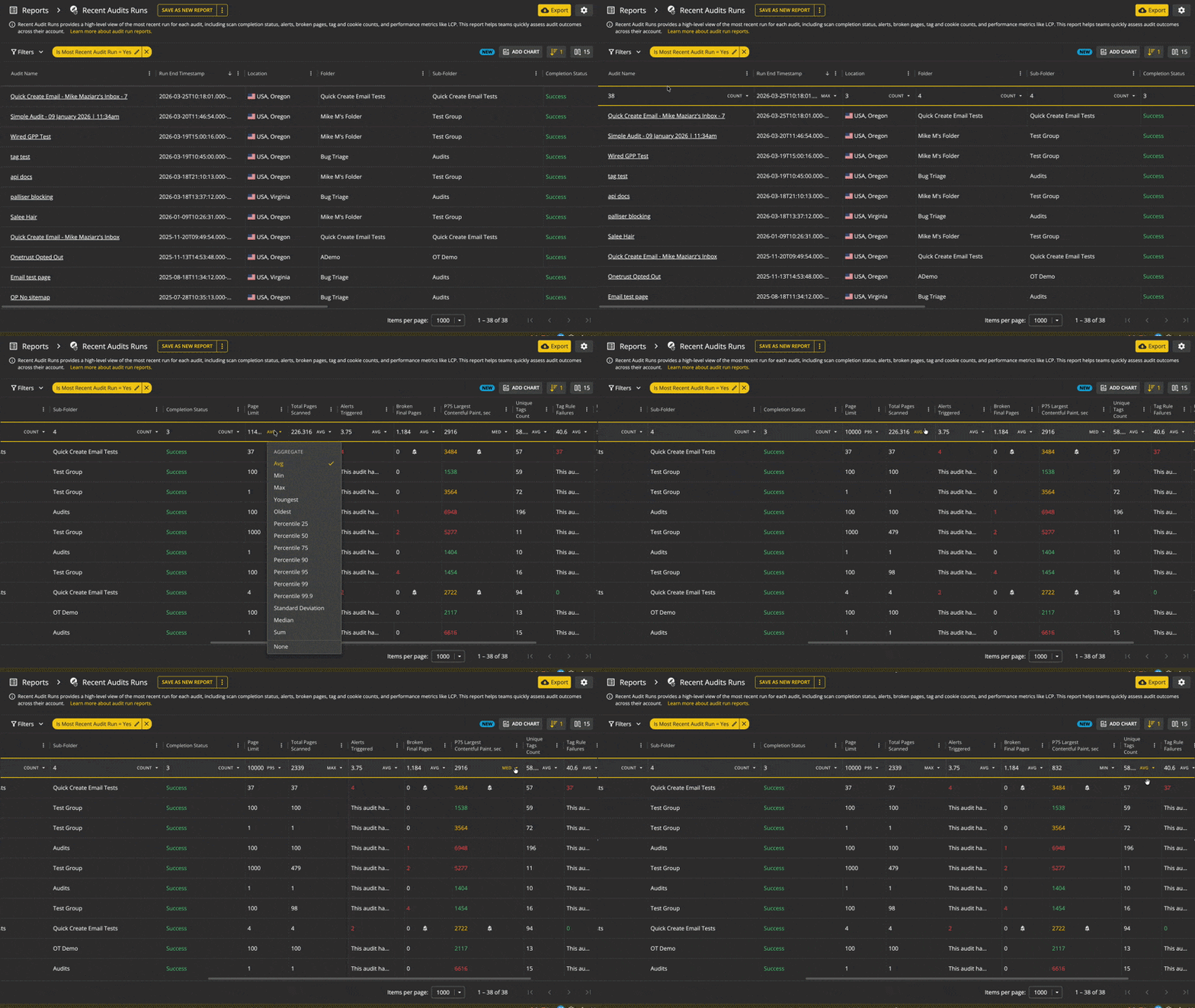
A row at the top of reports that shows real-time stats without exporting data or leaving ObservePoint.
Why You’ll Like It
- Quick stats likesum, count, average, min, and max without leaving the report.
- Users can select different stats per column based on the type (e.g. “Oldest” for timestamps or “P95” for performance metrics).
How It Works
- Aggregation Row: See column stats at the top of each report that stays visible while scrolling.
- Multiple Functions: Users can choose from 15 stats per column.
Read more in the help documentation.
AUDIT RULES RESULTS REPORT
Get tag and variable rule results at scale.
What It Is
A centralized report of rule results from all of your audits.
Why You’ll Like It
This report is essential for customers who have lots of Audits and rules and want to understand what’s happening across all of them. Previously, users had to click into each Audit run to see which rules passed or failed. Now, you can see all rules for all Audits across your entire account in one place, including historical trends and current state.
How It Works
The report aggregates rule results from Audits, including configuration details, findings, email notifications, and pass or fail status. Users can filter, group, and aggregate results to identify trends and track outcomes over time.
- Available within reporting
- Click here to view your rule results in ObservePoint
- Designed to provide a unified view of rule activity for tags and analytics use cases
Read the help doc for more information.
SELF-SERVE SSO
Single Sign-on (SSO) configuration is now easier and faster than ever.
What It Is
SSO configuration no longer requires a meeting with an ObservePoint team member. Set up your own SSO in the new “Single Sign-on” settings screen. Go to the SSO setup page now to see it in action.
Why You’ll Like It
- Accelerated Time-to-Value: SSO config is no longer a bottleneck, taking only a few minutes to do what previously took weeks.
- No ObservePoint Login Necessary: Your company’s IT staff can now set it up without an ObservePoint login.
How It Works
- Configuration: Easy to set up.
- Validation: Easy to test before going live.
- IT Collaboration: Admins can share a secure link with their internal IT departments to perform the technical configuration without giving them full platform access.
Read the help doc for more details.
BULK UPDATE ONETRUST
Update many OneTrust consent categories in a jiffy.
What It Is
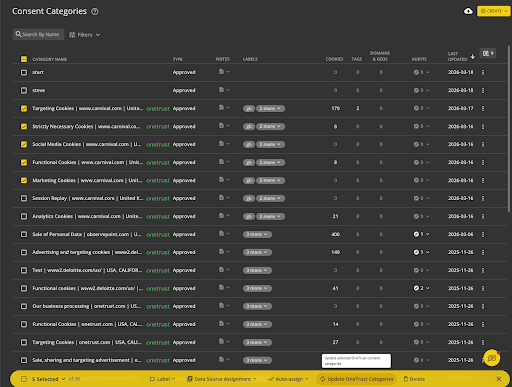
Update consent categories in bulk.
Why You’ll Like It
- No more editing categories one-by-one
- Easier to keep classifications clean, accurate, and up-to-date
How It Works
- Select multiple consent categories at once
- Choose Update from the dropdown in the upper-right
- Apply your changes in bulk – all selected categories will update instantly
NEW CMPs ADDED
Added three new Consent Management Platforms to our list of supported CMPs.
What It Is
We’ve added Ketch, Transcend, and CookieFirst consent managers to our list of automatic Accept/Reject CMPs.
Why You’ll Like It
Easily test that your CMP is working correctly when users opt in or out of tracking. Previously, users had to set up 3 actions with complex CSS selectors. Now you can use a single action, no CSS required.
How It Works
Simply select the in-app action to accept all or reject all to verify these cookies.
The full list of supported CMPs:
OneTrust, TrustArc, Tealium, CookieBot, UserCentrics, Cookie Control, Didomi, CHEQ (Ensighten), Piwik PRO, CrownPeak (Evidon), Cassie, CookieYes, Consent Manager, Cookie Information, Ketch, Transcend, CookieFirst
NEW API DOCUMENTATION
Upgraded API documentation to be more unified, modern, and interactive.
What It Is
API references, recipes, and use cases have been consolidated into one location for faster discovery and adoption.
Why Your Developers Will Like It
- Interactive Testing Environment: Users view examples of the endpoints within the documentation, making it easier to validate requests and learn capabilities without setup overhead.
- Improved Developer Experience: Clearer structure, syntax highlighting, and search make documentation more accessible for all technical levels.
How It Works
See the new API docs below.
- Interactive testing capabilities allow users to try endpoints directly within the docs
- Deep linking and better search enhance readability and navigation
Here’s the documentation.
ACCESSIBILITY TESTING IN DEBUGGER
Brought WCAG accessibility testing into the Chrome Debugger.
What It Is
Quick single-page accessibility testing and verification in real time through our Debugger tool.
Why You’ll Like It
- Instant Verification & Remediation: Users can test for WCAG compliance page-by-page without leaving the page they are working on. This new capability accelerates the fix-verify loop for developers and QA teams.
- Visual Issue Localization: The new feature includes the ability to visually highlight issues directly on the page. This allows users to instantly see where an accessibility violation exists within the UI, rather than hunting through code or generic lists.
- Seamless Comparison: Users can perform accessibility scans on different pages during a browsing session, allowing for easy comparison of accessibility scores and issues across various parts of their site.
How It Works
The ObservePoint Chrome Debugger will now feature a dedicated Accessibility tab.
- Step 1: The user navigates to a page and opens the Debugger.
- Step 2: They select the Accessibility tab to run an automated WCAG scan on the current page.
- Step 3: The tool generates a report of violations with detailed information of what the failure is and where it can be found.
- Step 4: Users can toggle a “Highlight” feature to overlay boxes or indicators on the live webpage, pinpointing exactly where the specific errors (like missing alt text or low contrast) are located.
Read more in the help documentation.
SCHEDULED REPORT UPDATES
Block sends of empty scheduled reports.
What It Is
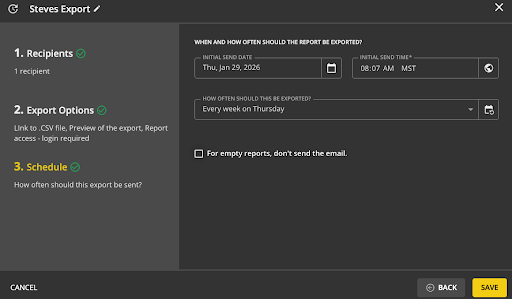
There’s now a checkbox to mark if you don’t want a scheduled report to send if it has zero data. You can then have the scheduled report act as an alert only for when something goes wrong.
Why You’ll Like It
- Noise Reduction: Suppress empty exports to keep inboxes clean and ensure emails only arrive when action is required.
- Efficient Monitoring: Easily turn a standard scheduled export into a functional alerting system for exceptions.
How It Works
A new checkbox option is available on step 3 of the scheduled export modal. This allows you to prevent an email from being sent for a scheduled report if it contains no data (zero rows) at the time of export.