What is a Website Tag?
 September 22, 2026




What is a Website Tag?
In the marketing and analytics space, a website tag is a piece of code on a webpage that gathers information about users of your site and how they interact with it. A tag can take the form of a snippet of JavaScript code, a small pixel, or a transparent image that you install on all or some of the pages on your site. And they can also be referred to as a site tag, analytics tag, tracking code, or web beacon.
Regardless of the format of the tag, most tags come from a third-party vendor and are installed by a developer, IT professional, analyst, marketer, or tag manager to help measure the success of marketing activities.
Web tags generally fall into six categories, based on how they function:
- Digital Measurement: Tags that track and measure user interactions across a website or app, gathering data on traffic, page views, click events, and conversions to show how a site is performing.
- Web Analytics: The tags that power tools like Google Analytics and Adobe Analytics, collecting data on traffic, engagement, and content performance.
- Advertising: Tags that support ad campaigns by tracking impressions, clicks, and conversions. They enable retargeting, audience segmentation, and cross-platform attribution.
- Custom: Tags built for a specific business need that prebuilt tools don’t cover.
- Testing & Personalization: Tags that run A/B tests, multivariate tests, and personalized experiences so teams can see what drives engagement and conversions.
- Voice of Customer: Tags that collect direct feedback through surveys, polls, widgets.
What is a Website Tag Used For?
The most common use case for installing a tag on your website is to gather data for a digital analytics solution or to send information to an ad server.
When someone visits your site, an analytics tag shares data about that visit with your analytics server so that your analyst can make recommendations to improve site performance or optimize marketing campaigns.
An advertising tag on your web page would send a cookie to the ad server when a visitor completes an action, like filling out a form or making a purchase, so it can attribute that conversion to the ad that the visitor clicked on to get to your site.
Other tags support narrower jobs like running an A/B test on a landing page or collecting survey responses through a feedback widget.
Ensuring the correct operation of your website tags is critical to decision- making. Inaccurate data, like a broken tag, severely compromises your decision-making process. This makes it difficult to evaluate campaign success, refine digital strategies, or manage ad spend effectively.
Ultimately, making poor marketing choices based on faulty metrics negatively impacts your bottom line.
How Do Website Tags Work?
Website tags work by executing code in the user’s browser to capture an interaction and transmit the data back to a server. This is how it works for the analytics, advertising, and personalization functions covered above, as well as other functionalities on your site, like session replay and live chat.
Here’s an overview of what that process looks like for a website tag:
- Someone visits your site, and the browser requests a page from the server
- The server sends the page and tag code to the user
- The tag fires and collects data on the session
- Data is sent to a third-party server
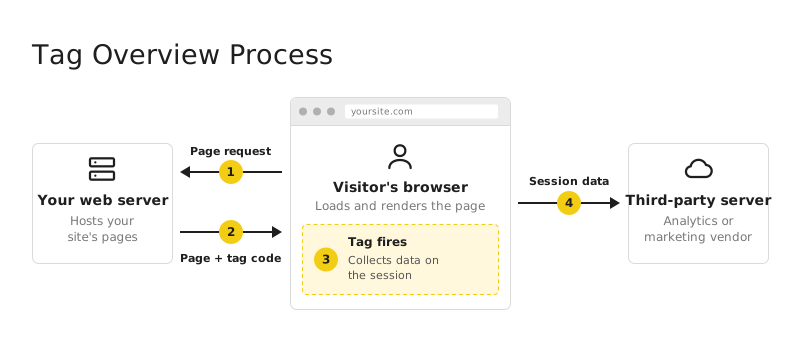
Once that data is located on the server, your analyst can make recommendations to improve performance and optimize marketing campaigns.
Best Practices for Website Tagging
The third-party tools you use to enable your marketing efforts are dependent on the functionality of the tags on your site. Unfortunately, because websites regularly change, tags often go missing, break down, or even end up twice on your site. This can happen when a developer renames or restructures a class during a redesign, when object property names change or when new page templates are deployed.
Depending on the tool, these errors might be no big deal and an easy fix. In other cases, having your tags go missing can be a major issue. When not properly governed, web analytics and other marketing tags can cause problems.
Common issues with web tags can include, but are not limited to:
- Inaccurate analytics reports
- Unauthorized access to sensitive personal data
- Excessively complex data analysis
- Slow page speeds
- Broken paths
The more tags you have, the higher the chances are that you will have broken, duplicated, or abandoned tags.
To keep your tagging ecosystem healthy and avoid issues there are several governance best practices to employ.
1. Leverage a Tag Management System (TMS)
A tag management system is a tool usually provided by a third-party vendor. The primary benefit of tag management systems is simplifying the process of implementing and maintaining a site’s tags through a more convenient web interface.
A TMS allows users to simply add, remove, or edit tags from a single point of control. Popular tag management systems include Google, Adobe, and Tealium. It’s important to note, however, that a TMS alone is not a foolproof solution for many of the same data quality problems that web analytics tags create. After all, “a single point of control” can also be a single point of failure.
2. Establish Continuous Tag Auditing
Auditing your tags requires systematically scanning your website to verify that tags are where you expect them to be and executing as they should. When paired with a tagging plan, auditing becomes a proactive data governance tool rather than reactive troubleshooting. Regular tag auditing can greatly improve the quality of the data passed through tags.
3. Monitor Integrity of User Journeys
Run tests across your website to ensure tracking doesn’t break during critical paths like multi-step checkouts, form submissions or account creations. This requires executing simulated interactions across sequences of pages to ensure tags are constantly up and running. Continuously testing these user journeys can help you identify where a tag breaks before it impacts attribution, audience targeting or optimization of a campaign.
4. Establish Release Rules That Include Tag Management
Define which tags you expect to see on each page and how you expect them to be formatted. With these rules providing a form of release validation, you can scan your implementation and catch and address any issues before pushing code updates live.
For companies with advanced or growing analytics implementations, a solution like ObservePoint can help them automatically audit and validate the integrity of their tagging over time.
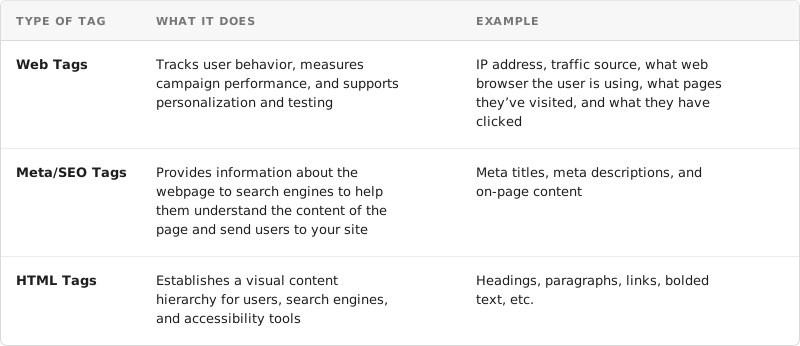
Web Tags vs Meta Tags vs HTML Tags
While web tags, meta tags, and HTML tags share very similar names, these three types of tags serve very different purposes on your website.
Understanding the role of website tagging, tag management, and tag governance is foundational to your data collection and web governance processes. Find out whether the tags installed on your site are functioning properly.