What Is Tag Management?
 August 10, 2026



What Is Tag Management and Why Is It Important?
Tag management is the practice of organizing, deploying, and monitoring website tags so they work correctly and don’t put site performance or user data at risk. Every website runs on tags: small snippets of code that send data to analytics platforms, ad networks, and marketing tools. A single site can carry dozens of them, added by different teams over different years, often without a clear record of what each one does.
For marketing and analytics teams, tag management is what keeps data trustworthy. If a conversion tag misfires or a tracking pixel loads on the wrong page, the numbers that inform ad spend, reporting, and product decisions go bad, often for weeks before anyone notices.
What Is a Tag Management System (TMS) or a Tag Manager?
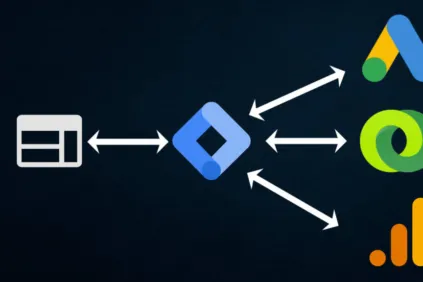
A tag management system, also called a tag manager or TMS, is a tool that lets teams add, edit, and remove tags without touching a site’s underlying code. Instead of asking a developer to hard-code a new tracking pixel or update an existing one, a marketer can add it directly through the tool’s interface.
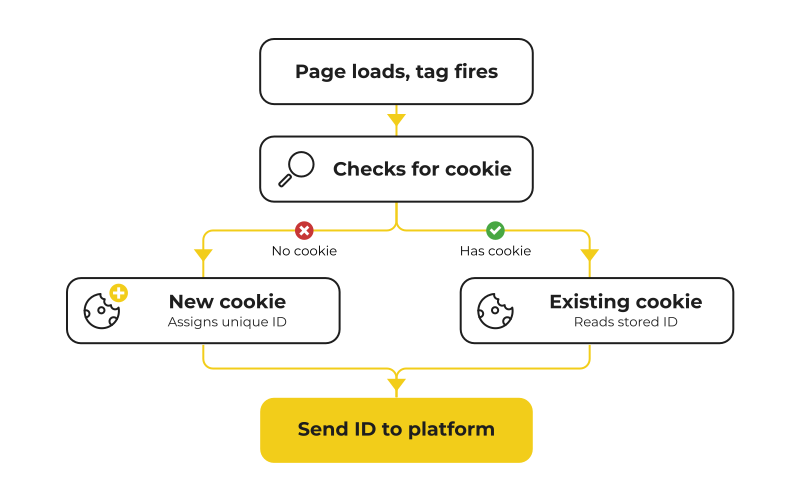
It helps to be precise about what “tag” means here, since the word gets used a few different ways. A website tag, or a tracking pixel, is a piece of code that collects visitor data and passes it to an analytics or advertising platform. That’s different from a cookie, which is what actually stores and exchanges that data between the browser and the site, and different again from an SEO tag, like a blog category tag or an HTML meta tag, which has nothing to do with tracking at all. A tag management system only deals with the first kind.
How Does a Tag Manager Work?
Underneath the interface, most tag management systems rely on a data layer: a structured object that holds the information a site wants to track (a product name, a cart value, a form field) in a consistent format. The data layer sits between the site itself and the tags plugged into the tag manager, so when a tag needs a piece of data, it pulls from the same defined source instead of scraping the page in an inconsistent, fragile way.

Google Tag Manager is the most widely used tool in this category, and for many teams it’s the default choice because it’s free and integrates easily with other Google products. But Google Tag Manager is only one option. Adobe Experience Platform Launch, Tealium iQ, and Ensighten are also tag management systems, each with different strengths around governance, server-side deployment, and enterprise-scale control. Check out our round-up of the best tag management systems for more details.
What Does a Tag Manager NOT Do?
A tag manager does not verify that tags are actually firing as intended. A tag can be configured correctly in the tool and still fail in production because of a conflict with another script, a change to the page’s structure, or a consent setting that blocks it. A tag management system is only as reliable as the tag management strategy behind it, and a web tag audit is part of that strategy to validate and monitor the tag manager’s behavior.
What Makes a Tag Management System Reliable?
What separates a well-run tag manager from a messy one isn’t just the software, but the processes and rules that a team builds around it:
- who has permission to publish changes
- whether tags are tested in a staging environment before going live
- whether the tag inventory gets audited on a regular schedule
This governance layer is more important when many teams affect the website. Before tag management systems, developers would hand-edit the site’s code, then test to confirm nothing broke. When tag management systems removed that bottleneck, permissions and testing became even more necessary to maintain QA, since a site with no oversight quickly fills up with tags nobody remembers adding. In addition, privacy compliance expectations require closer attention to tag functionality, data collection, and data egress.
Why Do Teams Adopt Tag Management Systems?
Teams adopt a tag management system for a few practical reasons:
- less dependency on developer time
- a single place to see every tag running on a site
- a way to enforce consistency across pages and campaigns
Less dependency on developer time means a new campaign pixel can go live the same day as needed, so marketing and analytics teams can keep moving quickly.
A single place to see every tag also makes it far easier to confirm the same conversion event is tracked the same way on every page, rather than discovering months later that one landing page was never wired up correctly.
That visibility is what makes governance possible in the first place: a record of what’s running, who added it, and when.
Benefits of Tag Management Systems
The case for a tag management system comes down to speed, consistency, and control.
Together, these benefits are why tag management systems have become standard practice rather than a nice-to-have, especially for teams running frequent campaigns across multiple domains, pages, or regions. For a closer look at how these benefits play out in practice, see our post on the top 5 benefits of a tag management system.
Whether your team is evaluating tag management systems for the first time or auditing an existing setup, understanding what’s actually firing on your site is the first step toward trustworthy data.