Best Tag Management Systems for 2026: A Full Comparison
 September 24, 2026




Tag management used to be a simple choice: pick a vendor, drop in a container tag, and let marketers stop bothering developers every time they wanted to add a website tag. That’s still true. But the market underneath that simple pitch has changed a lot since we last ranked the options.
Ensighten became CHEQ. TagCommander became Commanders Act. Adobe retired the Launch name. And a handful of categories that didn’t exist a few years ago: edge tag management, server-side GTM hosting, CMS-native pixels, now compete for the same budget.
This guide covers the best tag management software, services, and solutions worth considering in 2026. This includes the core enterprise systems, the leading Google Tag Manager alternatives, and the newer categories reshaping how tags actually get deployed.
Article contents:
- What Is a Tag Management System?
- What Does It Mean When a Tag Fires?
- Best Tag Management Systems
- Beyond the Traditional TMS: Newer Tag Management Categories
- How to Choose the Right Tag Management System
- Why Tag Management Alone Isn’t Governance
What Is a Tag Management System?
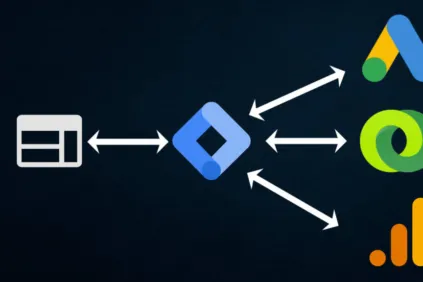
A tag management system (TMS) is a platform that lets you deploy every tag on your website through a single container, instead of hardcoding each tracking script into your site. New to the concept? Read our full guide to what tag management is and how it works.
What Does It Mean When a Tag Fires?
A tag fires when its code runs on a page. Inside the TMS interface, you set rules or triggers, and the container tag fires other tags based on those rules. Common triggers include page views, form submissions, scroll depth, and time delays. You can also restrict tags to specific dates, devices, or user segments.
Best Tag Management Systems
Explained below are the most popular enterprise-grade tag management solutions. We start with the default choice for many companies, Google Tag Manager (GTM). And then we cover some alternatives to GTM that most companies land on when they outgrow, or never start with, Google’s free option.
1. Google Tag Manager
Google Tag Manager (GTM) is still the default choice for most companies, largely because it’s free and deeply tied to the rest of the Google ecosystem. But the product itself looks different than it did a few years ago. Google has been consolidating its tagging under a single “Google tag” concept: the old GA4 configuration tag and Google Ads conversion tags now route through one unified Google tag rather than separate implementations, and Floodlight tags load through that same layer. In 2026, Google also rolled out a redesigned overview page and a no-code visual event tracking feature, aimed at making container setup easier for non-technical users.
Feature highlights:
- Free, with no user limits
- Unified Google tag for GA4, Google Ads, and Floodlight
- Visual, no-code event tracking
- Massive community and template library
Learn more about Google Tag Manager.
2. Adobe Experience Platform Tags
What most people still call “Adobe Launch” was rebranded in July 2021. The client-side product is now called Tags, living inside the Data Collection UI in Adobe Experience Platform. Launch Server Side became Event Forwarding, and Edge Configurations became Datastreams. The underlying product hasn’t changed much, but if your team is still searching for “Adobe Launch,” you’ll land in a renamed interface.
Adobe Tags is free to Adobe Experience Cloud customers and remains the natural choice for companies already committed to that ecosystem, thanks to one-click extensions for Adobe Analytics, Target, and Audience Manager.
Feature highlights:
- Included with any Adobe Experience Cloud license
- Native, one-click integrations with Adobe products
- Extension marketplace for both Adobe and non-Adobe tags
- Server-side option through Event Forwarding
Learn more about Adobe Experience Platform Tags.
3. Tealium iQ Tag Management
Tealium remains a heavyweight for companies running multiple high-traffic sites or complex data requirements. One change worth noting: Tealium iQ Tag Management is no longer marketed as a standalone flagship, it’s now a module inside Tealium’s broader Customer Data Hub, alongside the company’s CDP and API hub capabilities.
Feature highlights:
- Deep integrations across ecommerce and CMS platforms
- Built-in consent management
- In-platform data layer for variables and load rules
- Now packaged as part of Tealium’s Customer Data Hub
Learn more about Tealium iQ Tag Management.
4. CHEQ Manage (formerly Ensighten)
Ensighten was acquired by CHEQ, an Israeli cybersecurity company, in 2022. The tag management product now goes by CHEQ Manage. CHEQ’s own materials aren’t always consistent about naming, some reference “CHEQ Control & Compliance” for the consent side of the business, so worth confirming the current terminology with a rep before publishing anything client-facing. What hasn’t changed is the product’s focus: security, governance, and granular permissions for large, policy-driven organizations.
Feature highlights:
- Centralized governance across client-side and server-side environments
- Role-based permissions and full audit trails
- Server-side data collection for performance and accuracy
- Prebuilt integrations, APIs, and templates
5. Commanders Act Enterprise Tag Manager (formerly TagCommander)
Commanders Act, based in France, renamed its TagCommander product to Enterprise Tag Manager. It remains a strong option for companies with heavy GDPR and broader EU compliance requirements, offering server-side integrations with GTM and more than 100 server-side destinations alongside its data transformation and consent tools.
Feature highlights:
- Server-side integration with GTM and 100+ destinations
- No-code data transformation and enrichment
- Advanced consent management and privacy dashboards
- Enterprise support with role-based workflows
Learn more about Commanders Act Enterprise Tag Manager.
6. Piwik PRO Tag Manager
Piwik PRO remains the go-to answer for teams that need GTM-equivalent functionality without sending data to Google, particularly in healthcare, finance, and government. It bundles tag management with analytics, consent management, and a customer data platform, and supports EU-based hosting for teams with data residency requirements.
Feature highlights:
- GDPR, HIPAA, and CCPA/CPRA-oriented compliance features
- EU-owned server hosting options
- ISO 27001 and SOC 2 certifications
- Bundled analytics, consent manager, and CDP
Beyond the Traditional TMS: Newer Tag Management Categories
The six platforms above still fit the classic definition of a TMS. But several categories have emerged since 2022 that solve the same underlying problem, getting tags onto a page without a developer, in genuinely different ways.
Edge Tag Management: Cloudflare Zaraz
Cloudflare Zaraz takes a structurally different approach than a conventional TMS. Instead of loading vendor JavaScript (Google Analytics, Meta Pixel, and similar tools) directly into the visitor’s browser, Zaraz runs those integrations inside Cloudflare Workers at the edge, in front of the origin server. The browser only loads a small Zaraz runtime, and Cloudflare pitches this openly as a faster, more private replacement for GTM. Cloudflare moved Zaraz into its own “Tag Management” category in its dashboard as recently as February 2025, a sign of how seriously it’s positioning the product.
Learn more about Cloudflare Zaraz.
Open-Source Tag Management: Matomo
Matomo Tag Manager is one of the few genuinely open-source options in this space, and it’s the natural fit for teams that previously would have looked at Qubit’s now-defunct OpenTag project. It’s free, self-hostable, and pairs naturally with Matomo’s own privacy-first analytics platform, making it a common pick for organizations that want full data ownership and no third-party data sharing.
Learn more about Matomo Tag Manager.
Server-Side GTM Hosting: Stape and Addingwell
This entire category didn’t really exist a few years ago. Running server-side GTM requires hosting a container somewhere, and providers like Stape and Addingwell have built businesses specifically around that hosting layer: managed infrastructure, adblock-resistant loading, geo and user-agent enrichment, and simplified setup, all without requiring a team to manage their own Google Cloud Platform deployment. If your organization has already committed to GTM but wants the performance and privacy benefits of server-side tagging, this is worth evaluating before assuming you need to switch platforms entirely.
Learn more about Stape or Addingwell.
CMS-Native Tag Management: Shopify Web Pixels
Shopify’s Web Pixels API lets merchants connect marketing and analytics pixels to standard Shopify customer events (page views, checkouts, add-to-cart) without a general-purpose TMS. It’s a real, Shopify-documented capability, not simply a pixel panel bolted onto the admin. Worth noting: this is scoped specifically to Shopify’s own event model, so it’s a fit for merchants who don’t need a TMS that spans other properties. Other CMS platforms haven’t followed suit in the same way. Wix and HubSpot, for instance, ship basic pixel panels rather than true tag managers, and Wix’s own documentation still directs users to install GTM for anything beyond the basics.
How to Choose the Right Tag Management System
Use these priorities to narrow your shortlist to one or two platforms worth a demo or trial.
| Priority | Best Fit |
|---|---|
| Limited budget | Google Tag Manager |
| Already on Adobe Experience Cloud | Adobe Experience Platform Tags |
| Multiple high-traffic sites, complex data needs | Tealium iQ Tag Management |
| Security and governance-driven organization | CHEQ Manage |
| Heavy EU/GDPR compliance requirements | Commanders Act Enterprise Tag Manager |
| Regulated industry (healthcare, finance, government) | Piwik PRO Tag Manager |
| Privacy and performance at the edge | Cloudflare Zaraz |
| Full data ownership, no vendor lock-in | Matomo |
| Already committed to GTM, want server-side benefits | Stape or Addingwell |
| Shopify-only, simple event tracking | Shopify Web Pixels |
Tag Management Alone Isn’t Governance
A few years ago, the advice here would have been simple: pick a TMS, pair it with regular tag audits, and call that governance.
Today, tagging has split across client-side, server-side, edge, and CMS-native implementations, often within the same organization. A single TMS dashboard, even a good one, no longer shows you everything firing on your site. Server-side containers, edge workers, and CMS-native pixels all sit outside the traditional TMS view.
That’s exactly why independent auditing matters more now than ever. Whatever combination of tools you land on, you need a way to verify what’s actually deployed across every environment, not just what your TMS reports.
See what’s currently firing across your site with a free analytics audit, and pair it with a look at how to conduct a tag management audit to build a repeatable process.