Is Playwright an ObservePoint Replacement? What to Know Before You Decide
 November 17, 2026


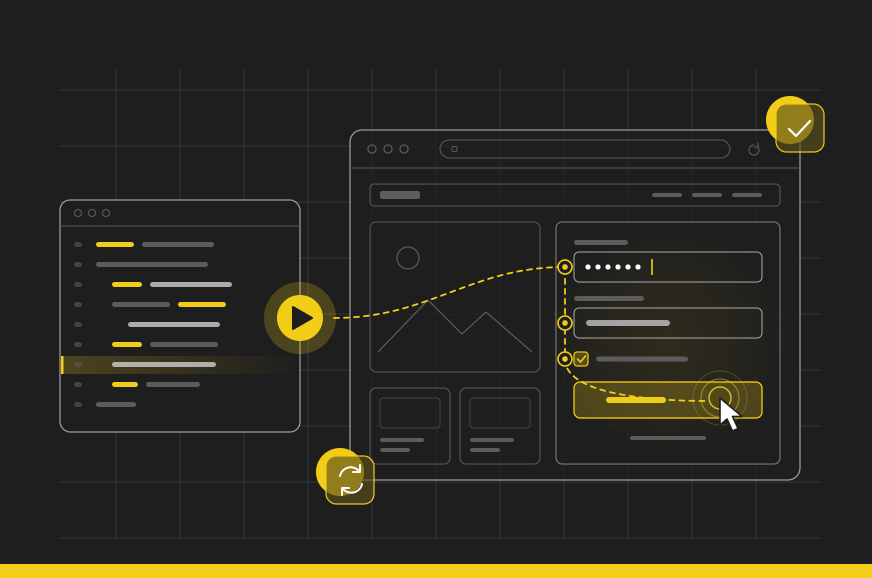

Asking if Playwright can replace ObservePoint is like asking if an engine can replace a car. Playwright is a great engine. Everything around it, you have to build.
It usually starts the same way: the analytics team requests ObservePoint, and engineering pushes back: “We already run Playwright in CI/CD. Why drop another $50k on a new tool?”
Fair question. Here is the reality for both sides.
The short answer: Playwright can’t replace ObservePoint for web governance. Playwright runs the checks your engineers write on the pages they list, while ObservePoint finds pages for you and identifies every tag, cookie, and consent issue on them, with no code to write or servers to maintain.
What Is Playwright, in Plain English?
Playwright is a Microsoft tool that lets engineers script browser actions step-by-step: “Go to checkout. Click the button with the ID add-to-cart. Click the button with the ID buy-now. Confirm the page title reads “Thank You.” The script runs in seconds, as often as you want, on a computer that you provide.
Engineers use it to test sites before shipping changes. But Playwright only checks what you tell it to check. An engineer must code every rule, like “verify the page title says My Cart” or “confirm the checkout button is visible.”
That means every single check is code. A developer has to write it, test it, and update it whenever the site changes.
Two things people often get wrong about it:
- The license is free; the work isn’t. Playwright is open source, but someone still has to write scripts and maintain them as your site changes. Those scripts also need somewhere to run. Either Playwright Workspaces (Microsoft’s paid hosted service) or servers your own team manages.
- WebKit isn’t Safari. Playwright tests WebKit, the engine underneath Safari. It does not run actual Safari on macOS or iOS.
Tools like Playwright, Cypress, and Puppeteer lack native crawling, tag recognition, and consent testing. That’s not a flaw. They were built for a different job. Cypress states it plainly: it isn’t optimized for indexing the web, spidering links, or scripting third-party sites.
Playwright also lacks native data retention. It runs a check, outputs the immediate result, and forgets it. Without a historical database, it cannot show you what changed over the last month.
What Playwright Hands You
With some additional code to capture it, Playwright can hand back two long lists: every request the page sent and every cookie it set. One line from each looks like this:
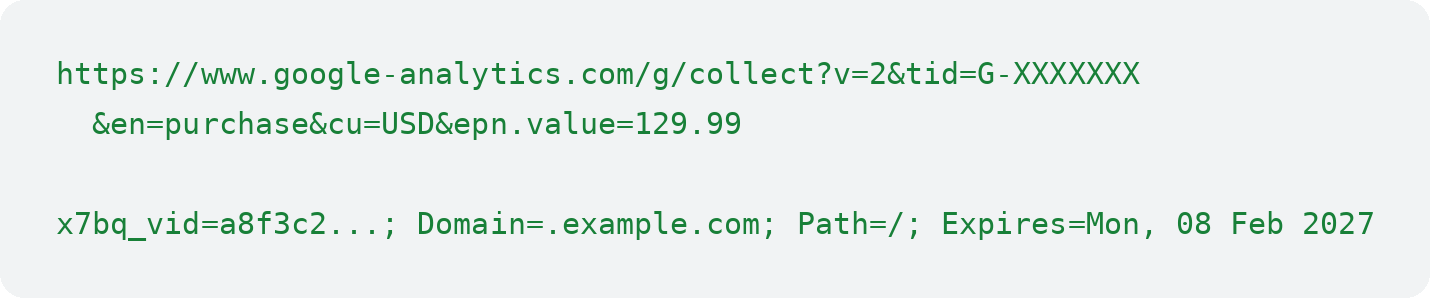
No labels. No explanation. Nothing that says, “this one’s the problem.”
Classifying those entries isn’t just a basic scripting problem. While AI makes writing code cheaper, maintaining accuracy requires thousands of recognition rules to identify each vendor, purpose, and category. Tags change over time, so a rule that matched last month can stop matching. And existing tags can load new ones your system never detects.
Multiply that across every request on every page of your site. Playwright captures the network traffic, but it cannot interpret what any of it means.
Five Questions Playwright Can’t Answer
First, the main limitation: Playwright lacks an automated crawler. It only visits explicit URLs hardcoded into scripts. ObservePoint automatically discovers pages by crawling sitemaps and links, up to 1 million pages per audit. Even on the pages you manually list, raw network data leaves five basic questions unanswered out of the box.
What is this request?
That long web address is Google Analytics recording a purchase. To know that automatically, you’d need a database of thousands of URL patterns, one for every vendor that could fire on your site. Then someone has to keep it current as vendors change their endpoints. A raw request on its own doesn’t say who sent it.
What is this cookie?
Famous cookies are easy to look up. Custom cookies aren’t, and your site probably sets dozens like them. A cookie list gives you a name, value, domain, expiry, and a few security flags. It doesn’t say what the cookie is for, how risky it is, or which tag set it. Answering that takes a reference library of cookies, and someone who keeps adding to it.
Should it be here right now?
A cookie that’s fine after a visitor clicks, “Accept All” is a problem after “Reject All.” So the audit has to make each choice on the banner, then check what fires. “Reject All” is a different button in a different place on OneTrust than on Didomi, and banners change. Now repeat that for every consent choice, in every region you care about.
What does a visitor in Germany see?
Consent banners go by the visitor’s IP address. Telling a browser to pretend it’s in Berlin changes what the browser reports, not the IP address the website sees. To see your site the way a German visitor does, you have to scan from Germany, with real servers or proxies there.
What changes, and who needs to know?
One scan is a snapshot. Comparing this week to last month, keeping a record legal can use, and alerting the right owner are all ours to build. All three need a history of past scans, and Playwright doesn’t keep one.
How ObservePoint Answers Them
With Playwright, you must build all five capabilities from scratch. ObservePoint delivers them standard:
- Requests: Tags are recognized by vendor, with the variables inside them read for you, like the event name and order total.
- Cookies: The Cookie and Tag Database answers all of the above questions and more, built on more than 4.5 billion cookie scans. The cookies found on your site arrive already identified, and your team can add owners, approvers, and notes.
- Consent: Accept All and Reject All automated on 20+ consent platforms, plus scans as a browser sending a Global Privacy Control (GPC) signal.
- Location: 34 scan locations, plus 281 more through proxies. Playwright Workspaces runs in 6 regions.
- History: 13 months of history by default, and up to 7 years. It compares runs and alerts the people who own each problem.
- Hosting: ObservePoint runs all the infrastructure, so you don’t manage servers.
The Scorecard
✓ Works out of the box. ✗ Build, host, and maintain it yourself.
Cypress and Puppeteer score the same as Playwright on every row.
| Capability | ObservePoint | Playwright |
|---|---|---|
| Collecting data | ||
| Set up scans without writing code | ✓ | ✗ |
| Load pages in a real browser | ✓ | ✓ |
| Capture requests and cookies | ✓ | ✓ |
| Screenshots | ✓ | ✓ |
| Log in and click through funnels | ✓ | ✓ |
| Crawl the whole site | ✓ | ✗ |
| Scan from chosen countries | ✓ | ✗ |
| Accept All and Reject All on major consent platforms | ✓ | ✗ |
| GPC signal and third-party cookie blocking | ✓ | ✗ |
| Understanding the data | ||
| Recognize tags by vendor | ✓ | ✗ |
| Read analytics variables (event, revenue, eVars, props) | ✓ | ✗ |
| Cookie and Tag Database: vendor, purpose, category, risk | ✓ | ✗ |
| Which tag set each cookie | ✓ | ✗ |
| Rules a non-engineer can write | ✓ | ✗ |
| Privacy and consent scans | ✓ | ✗ |
| Built-in knowledge of privacy laws like GDPR and CCPA | ✓ | ✗ |
| Accessibility scoring and trends (WCAG 2.0, 2.1, 2.2) | ✓ | ✗ |
| Tag accuracy, campaign link and email link checks | ✓ | ✗ |
| Web Vitals for every page | ✓ | ✗ |
| Running it | ||
| Scheduled runs | ✓ | ✗ |
| Hosted infrastructure for thousands of pages | ✓ | ✗ |
| Kept current with new browser versions | ✓ | ✗ |
| History from 13 months up to 7 years | ✓ | ✗ |
| Run-over-run reports | ✓ | ✗ |
| Alerts to the owner | ✓ | ✗ |
| User roles and permissions | ✓ | ✗ |
| Plain-language questions about audit history through AI | ✓ | ✗ |
This feature comparison highlights core platform capabilities, but it excludes the value of more than a decade of ObservePoint expertise. Building an in-house equivalent forces your engineering team to solve already-solved problems at your expense.
What “Free” Actually Costs
The license is free, and servers are cheap to rent. Maintaining them is the expensive part: server patches, security updates, monitoring, and fixing whatever breaks.
Our engineering team built a test Playwright crawler and executed a 100-page audit on a major news domain. Scaling that prototype to a 10,000-page enterprise site requires three hours of execution time and generates 1.2 GB of raw network payloads per run. Executing daily audits adds hundreds of gigabytes of raw storage annually, creating another internal system your team must host, back up, and troubleshoot when runs fail midway.
Ongoing upkeep is the true cost driver. Browsers update monthly, vendors update tracking endpoints, and CMPs update banner markup. Any of these silent changes will break custom data-collection scripts without warning.
Maintaining custom tooling requires permanent operational headcount, not a one-time setup sprint.
That ongoing commitment equals approximately 1.25 full-time engineering FTEs for maintenance and monitoring. At a fully loaded cost of $150,000 per engineer, custom tooling costs roughly $190,000 annually, every single year. Compare that against your ObservePoint quote.
Where Playwright Wins
Testing specific features on your own site before a release is exactly what Playwright is for. Does the cart update? Does the login work? For that job, it’s a great choice.
What it isn’t built for is telling you whether your analytics, cookies, and consent are right across your whole site. Your teams make decisions worth tens of thousands of dollars on that data, so it needs a tool made for that job.
The two work together. The ObservePoint API can kick off audits from your pipeline, and a GitHub Action starts one when code is pushed. Run both before every release: Playwright checks that your features work, and ObservePoint checks your tags, cookies, and consent. Then ObservePoint keeps watching the live site after it ships.
Keep the Engine. Get the Car.
Playwright can’t replace ObservePoint for web governance. Playwright is an open-source tool for scripting browser tests on the pages your engineers list, and it does that job well. ObservePoint is a hosted web governance platform that finds pages automatically by crawling sitemaps and links, recognizes tags by vendor, identifies cookies through its Cookie and Tag Database, tests consent on 20+ consent platforms from 34 scan locations, and keeps 13 months to 7 years of audit history with alerts to the right owner. Getting the same results from Playwright means building, hosting, and maintaining every one of those capabilities yourself, which costs roughly $190,000 a year in engineering time. Use Playwright to test features before a release, and use ObservePoint to verify the tags, cookies, and consent on the pages that matter to your business.
You don’t need more infrastructure to maintain. You need answers you can trust, and historical data Legal can rely on.
Learn more about how AI can or can’t help your web governance in our Build vs Buy Guide. To see ObservePoint in action, schedule a demo today. We’ll audit your site with you live: every tag named, every cookie categorized, and your consent banner tested.