Meet the New Cookie Report in the ObservePoint Debugger
 October 28, 2025




If you manage large websites, you know how important visibility is. You need to understand exactly what is happening with your tags and cookies, where they are firing, and whether everything lines up with your privacy standards.
Until now, getting that full picture usually meant digging through developer tools or juggling multiple extensions.
Not anymore.
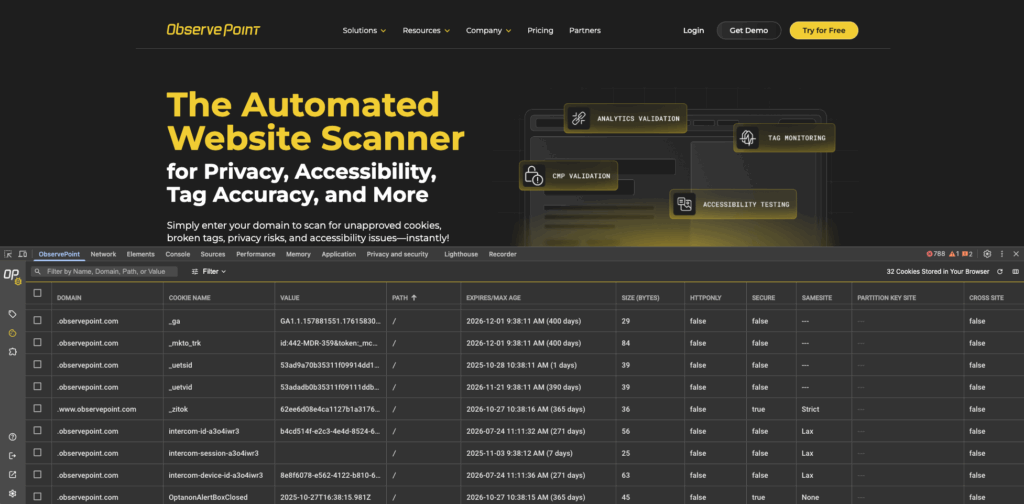
The ObservePoint Debugger, our free Chrome extension that thousands of digital teams rely on, now includes a brand-new Cookies report. It gives you the same fast, clear insights you already get for tags, now extended to every cookie stored in your browser.
Why This Matters
Websites are increasingly more complex and so are privacy requirements. Cookies are a big part of that story. They impact tracking, consent, and compliance, and a single rogue cookie can create privacy concerns and damage consumer trust.
The new Cookies report brings it all into focus. It gives you a simple, unified view of every cookie stored in your browser, across pages and domains. You can validate configurations, spot consent issues, and understand exactly how your site is behaving, all in one place.
The Debugger extension works in Google Chrome, Microsoft Edge, and ChatGPT Atlas browsers. And if you previously used the discontinued Awesome Cookie Manager, the Debugger is the perfect replacement. You can get it now from the Chrome webstore.
What’s New in the Debugger
Complete Cookie Visibility
- View every cookie currently stored in your browser, not just the ones on a single page or domain.
- Quickly spot consent or compliance problems, lingering cookies, or missing security flags such as Secure or SameSite.
- Get all the details at a glance: domain, path, expiration, size, partition, and more.
- If you want, you can even delete cookies right from within the Debugger. Just be careful, once a cookie is gone, it’s deleted from your browser and any site that was using it may need to reset the cookie.
Faster, Smarter, More Thorough Debugging
- Search, filter, and scroll through cookie data without hunting deep into the developer tools.
- Have confidence that you’re seeing all the cookies, even ones the page hasn’t interacted with yet.
- Helpful tooltips explain cookie properties, so that you can move fast without missing context.
Login Access for a More Connected Experience
To use the new Cookies feature, you’ll log in with your ObservePoint credentials.
- If you’re already an ObservePoint customer, use your existing login.
- If you’re new to ObservePoint, create a free account to access the Debugger and explore the full platform.
This update helps us support you better and connects the Debugger experience with ObservePoint’s broader suite of automated auditing and monitoring tools.
Available Now
The Cookies report and login experience are live in the latest version of the ObservePoint Debugger.
Login to your Chrome extension and start exploring today.