ObservePoint Tips: Supercharge Your Web Governance with the ObservePoint MCP
 September 3, 2026
 61 mins



Summary
Managing tag governance and privacy compliance at scale usually means clicking through dozens of screens to build audits, categorize cookies, and diagnose broken journeys one at a time — work that grows linearly with the size of your web footprint. In this ObservePoint Tips session, Nic Suder and Jake Bauer from ObservePoint’s Customer Success team introduce the ObservePoint MCP server, which connects your LLM directly to ObservePoint’s APIs so you can run those workflows through natural language, covering:
- What an MCP server is and how the harness, MCP, and ObservePoint APIs fit together
- Installing the connector and generating a scoped API key with the new API Key Manager
- What the MCP can do across audits, journeys, reports, account config, standards, and consent categories
- Stacking third-party MCPs — Jira, Playwright, Google Analytics — to automate work that spans systems
Nic runs it all live: spinning up a CCPA opt-out audit with OneTrust consent categories from a single prompt, generating an executive-summary PDF of slow-loading tags, analyzing which vendors still fire after Reject All, and repairing a deliberately broken journey. Watch the recording to see the prompts he uses and how the MCP handles each request end to end.
Key Takeaways
-
The MCP server turns ObservePoint into a natural-language interface, not just a read-only data pipeWith an admin-level API key, the MCP can create, edit, delete, and bulk-update audits and journeys, configure Tag and Variable Rules, set alerts, manage users and labels, and sync consent categories from your CMP. Nic built a fully configured CCPA opt-out audit — California geolocation, 100 pages, OneTrust strictly-necessary category, Reject All pre-audit action — from one prompt.
-
Consent category management gets dramatically fasterThe multi-step OneTrust importer workflow collapses into a request like “pull in the consent category specific to Brazil and assign the appropriate categories to the appropriate audit.” For teams running privacy audits across many regions, Nic described one-shotting hundreds of audits with correct regions, categories, and labels in a single prompt.
-
Journey repair at scale is the standout use caseThe MCP can list broken journeys, diagnose the failure, prescribe a fix, apply it, and re-run — demonstrated live on a deliberately broken login journey. One attendee reported fixing 20 journeys in a single request.
-
Stacking MCPs is where the real automation livesYour LLM isn’t limited to one connector. Pairing ObservePoint’s MCP with Jira means a missing variable can open a ticket automatically; pairing it with Playwright helps build journeys; pairing it with Google Analytics lets you pull your top 1,000 pages every Monday and feed them straight into an audit as starting URLs.
Speakers


Webinar Transcript
Welcome, everyone. I can see participants jumping in. Thank you all for joining. We're going to give it a couple of minutes and let people in. This week we have quite a few registered, so we're pretty excited. As you're coming in, we'd love to hear where you're from — you can make sure chat's working and post where you're from. Both Jake and I are in Utah, headquartered in Pleasant Grove. Jake, are you able to see chat on your end?
Yes. It's great to see a lot of familiar names out there.
Let's jump right into it. Again, thank you, everyone, for attending. We hold these ObservePoint Tips webinars every month. I know there are a lot of new faces here, so — shameless plug — if this is your first one and you haven't subscribed to the series, go to our website, to the homepage, blog, and webinars, and you can subscribe to ObservePoint Tips. These are enablement sessions held by the customer success team, so there are going to be a lot of friendly faces. Most of the time you're going to see an individual or two that you work with day in and day out with ObservePoint. And if you have specific topics you want us to cover during these sessions, bring it up with your Customer Success Manager and we'll put it on the docket for future ObservePoint Tips sessions. I'll be hosting today. My name's Nic Suder, I manage our customer success team, and today the man himself, Jake Bauer, is joining me — the man in the yellow jacket. Jake is one of our most tenured CSMs here. He works with some of our largest and most strategic accounts. He's been at ObservePoint for, maybe, five years now?
Yeah, just over five years.
Excited to have you on the webinar. Let's jump right into it. We typically start with ObservePoint releases — we'd like to go through a couple of the releases and maybe some previews. I'll kick it over to you, Jake.
Great, thank you. Just as a caveat, I've had some throat issues this morning, so if I have to go on mute to cough, my apologies in advance. To start off: archived items. If you haven't already seen this, it's been released. It's now replacing delete for audits and journeys, which is really exciting, because now you don't have to worry about permanently deleting something and losing all that data. Instead, it's going to archive it. You can see in the main menu there's an archived items folder that they will all go into, so they'll no longer clutter up your organization and the other folders you see — they'll be located in a completely different spot. Nic, if you want to go to the next slide: within the edit menu of an audit or journey, there's simply an archive button. It's really there to help you keep your instance clean, and still be able to get those back if needed. If it was an accident, you can pull that back, have all the data, and it'll load back up with everything that was previously there. So I'm super excited about this feature.
Yeah — you no longer need to add a folder called "Archived" where you put all the audits and journeys you're not ready to delete yet, but that may have data you want to go back and look at. You can now do that with the archived folder system. Next, the API Key Manager. I'll take this one. This whole section got a rework. You can find it by going up to the menu and selecting API Keys, and you're going to be presented with a whole new screen. I'm going to demo this live in a moment, so I won't go into a ton of depth here, but know that API keys let you create individual keys for either individuals or specific purposes — one reason may be the MCP server. There are a lot of settings around management as well. You can quickly disable them, you can set expiration dates, you can control whether it's read-write access or just read access. This new interface makes it very easy to interact with these. Here's what the creation process looks like: name, description, and user — that's going to control who's able to utilize this API key — and then at the very bottom, the expiration date. More to come here. Over to you, Jake.
Thanks, Nic. This is a super exciting one: the tag and cookie database. You've probably heard it talked about a lot from your CSMs, so here's a quick preview based on screenshots. In a nutshell, it's a database of all the cookies and tags that ObservePoint is capturing on your site. You'll be able to see and get access to definitions, vendor category, risk levels, risk reasoning, where it's found on your website, statistics — so much data on these cookies and tags. That's going to help you a lot in terms of reviewing cookies. When you find new cookies or new technologies on your site, you're going to be able to instantly know where it came from, what it does, what its typical usage is, and why it's there. One cool thing about the cookies, and probably the tags as well, is how to remove them. You can see from these screenshots all the data you'll be able to gather and the understanding you'll be able to get.
This is honestly a game changer for anybody who's gone through the pain point of a cookie appearing that you're really not sure about. You'll be able to click into that cookie and have a crazy list of information about it, including how to remove it. Let me go back a little bit — you can see there's the most common consent category, and for this GA cookie it's performance and analytics. It should give you a great starting point, especially if you're in the position of categorizing cookies or working with a CMP. It's also super valuable for legal teams to have a repository, or database, that outlines what each technology and cookie is doing across your website. I'll mention quickly, this is just a preview. Right now, for those who are interested, we can grant access specifically to the cookie database. The tag database is coming soon. There are a few other really cool things here I'll call out — there's going to be comprehensive history tracking, so you will have the ability to edit some of these fields, and if you make a change or an edit, that's going to show up in that history tracking.
There are a couple of questions. I know right now the chat is disabled and we're working on getting that fixed, but people are dropping them in the Q&A. The question is: can we create automation based on risk from the tag and cookie database?
Yes-ish. We're going to introduce, and I think answer, a lot of those types of questions as we talk about the MCP server specifically. Depending on the automation you're looking for, you will be able to set up essentially schedules or recurring actions within your LLM to either reference or update this database. You can also, based on very specific criteria, have it act on different things within ObservePoint. Hopefully as we go through the MCP server, it's going to answer those questions directly. And if I'm way off and you're talking about something else, hopefully once the chat's re-enabled we can dive into that further. Okay. Jake, you ready? Let's talk MCP server.
Let's talk MCP server. To start: if you have any questions, and people are already asking, please throw them in the chat when it's enabled. Otherwise, you can throw them in the Q&A as well. Our CSM team and others who are also on will be able to either help answer those inline, or we'll pull them out — like we've already demonstrated — and answer some of your questions live. As we jump into the topic of the MCP server, we want you to be thinking about use cases that you'd want to know whether the MCP can do. At the end of the webinar portion, we're going to do live demos with the MCP so you can see some of its capabilities. If there's a use case you'd like us to demonstrate, drop it in the chat or the Q&A and we'll cherry-pick some of those. We also have some demos to get your mind rolling about what the MCP can do.
I'm not seeing any of the chats come through — we're working on that. Write them down, though, if you do have questions, and bring them up with your CSMs as well. They'll have access to the same tools we're showcasing today, and they'll be able to demo these live with you. So that's another resource.
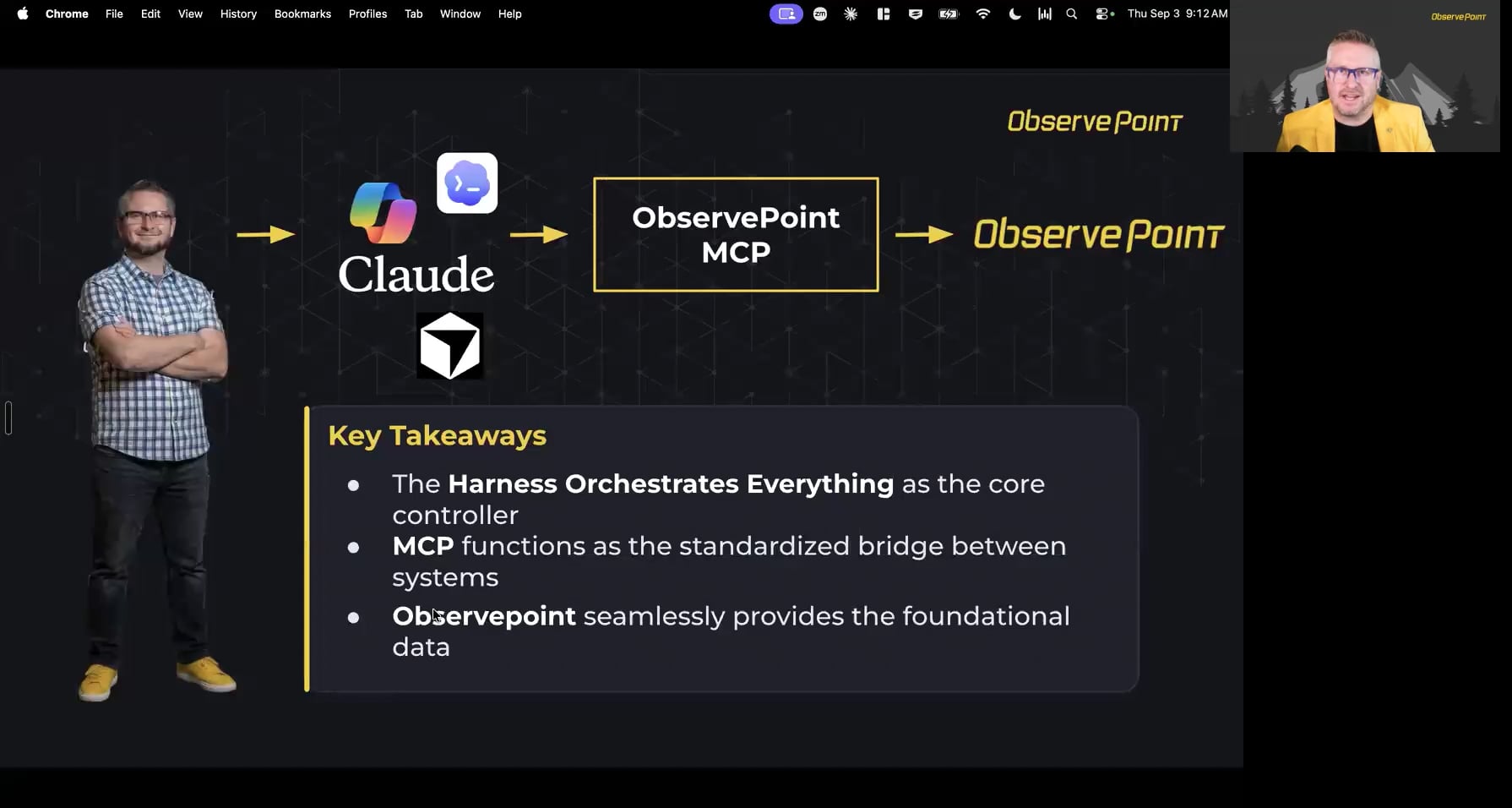
For some of us who are newer to this MCP world: what is an MCP? Essentially, right there on the bottom, it's a way to allow your LLM to access ObservePoint's APIs. It stands for Model Context Protocol. It's an open-source standard, and it provides a universal, plug-and-play way for AI models to connect to external data sources, tools, and workflows. We're really excited to be able to release ours. If you've used an MCP from another vendor, you know how powerful these can be, and we're looking forward to showcasing what it can do. In terms of how the MCP works, it's pretty simple. You've got your user there — this should be Nic's face — and you talk to your harness, like Claude or Copilot, whatever you're using. You just type in what you want, and it will go and fetch that data from the ObservePoint MCP and deliver it back to your LLM with that specific data, then push it back to you as an answer. That's the layman's terms on how it works. The key takeaways: the harness, like Claude or Copilot, orchestrates everything; the MCP functions as the bridge between the systems; and ObservePoint, by accessing our APIs, funnels all that data through that MCP, back to the harness, and back to you.
In a nutshell: the user sends a request to the harness, to Claude or something like that. The harness sends relevant information to the MCP server, the MCP server calls the ObservePoint API, and it filters all the way back to the harness where you're interacting with that LLM. While Jake was talking, we did have some individuals come in and say chat doesn't look like it's going to be enabled right now — but continue to use that Q&A section, because we do have people monitoring that live.
One of the questions that came in: what are the tools of the MCP, or the pre-configured prompts? There are a lot of tools in the ObservePoint MCP specifically, so you don't have to actually know the names of any of those tools. You just type in your prompt, and it will fetch the proper tool from the ObservePoint MCP and grab the data from there. So it makes it really user-friendly. There aren't really any pre-configured prompts, however, that's something we can look into. We might do some pre-configured prompts and put them in help documentation for you, to say, hey, what are some general prompts I can put in that will get me the data I'm looking for. But it's so nuanced based on each one of you, your roles within your organization, and what you're trying to get out of ObservePoint.
Really quickly, I want to demo how easy the installation process is. Right here, this is Claude. I'm demoing this from an end-user perspective, not as an admin. You'll be able to go to connectors, then Browse — and it's going to be very similar for different LLMs. You're going to have some sort of organization-enabled MCP servers. Ours has been enabled at our org level. You'll have to work with your AI overlords to make sure this gets enabled; they'll understand the process of getting this enabled for your account. And really quickly, I want to mention that we will have help docs ready for both individuals and for security teams and AI teams, to help them understand any sort of risk and what the MCP server is actually doing — just to make this process easier. But we're going to assume everything's approved on your end. This is what it's going to look like: you're going to look at your organizational MCP servers, and you're just going to hit install. I'm going to install this right now.
I'm going to interrupt you real quick. Yes, we are using Claude through our demo. I know there was a question that some aren't allowed to — that Copilot's not allowing them to use or support MCPs. We can probably get back to you on that one. I don't know if I have an answer now, but I think someone from our team might be able to help answer that question.
Once you install, it's going to ask for your API key. If you jump over to your good ol' ObservePoint account and navigate to our new API keys, you can quickly generate one. Again, this is assuming you have admin access within ObservePoint. You can go ahead and create a key — "MCP time. Excited to use ObservePoint MCP." You can name it, you can add a description. For the MCP, you want to make sure you have OP admin-level access, not read-only, because we want to enable this LLM to be able to make changes and update things within your account, along with extracting data. I'm just going to set it to 30 days, but know you can set any sort of expiration around this. I'll generate that key, copy it, and jump back over to Claude. I'm going to drop that API key in and hit save. From here, I'll jump back over to ObservePoint, click "I've copied this key and saved it somewhere safe," and hit done. You can see here that this is an active API key. Now, if we jump back over to Claude, all we have to do is enable it — and we should be good to go. If I start a new chat, which is what we're looking at right here, just to confirm — and again, this is Claude-specific, but other LLMs are going to be very similar — you can see now that we have a connector with ObservePoint. We're going to go through some live demos, but just to show that it's now successfully connected, I'm going to say: "Hey, from my ObservePoint account, can you outline all of the audits that I have created?" Something to keep in mind is that there are going to be different models you can use that are effective under different scenarios. Some are going to operate a lot faster; some are going to be slower but more intentional, and think through the process more thoroughly. For this demo I'm using Opus 5. It's going to be fairly quick, but you'll have to bear with us a little bit as it's processing things. I also want to note that you can always expand this right here, and it's going to outline exactly what's going on — the actual requests that are going through to ObservePoint. There's another one here. If that interests you, you're going to be able to see exactly what it's doing live. This should be pretty quick, because we're just fetching information. We'll give it a couple more seconds and then I'll show you what that output looks like.
While we're waiting on that — a question was asked: does it have write capabilities for making bulk actions?
Yes, it does. We'll get into that more in just a moment. Here we go: "You have five audits, all owned by you, under the folder ObservePoint.com, and all seeded from ObservePoint.com. Every one is currently paused. Last ran September 1st." It gives you some details around those audits that were created. You can see now that Claude specifically is connected, or has a way to speak with ObservePoint, which is really cool. Let's jump back to the slides and answer, at a high level, what the MCP server can do, and then let's go through some real-world examples. First off is audits. Jake?
Fantastic. So, audits — I might even help answer this bulk one. You can create audits, you can edit audits, you can pull audit data from a reporting standpoint. If you wanted to bulk create audits, you can. Or bulk delete audits, or bulk update audits specifically. So there are lots of great use cases around audits. I've only mentioned a couple, but the big ones to consider are creation, editing, and deleting — and then bulk actions for those as well.
I'm thinking of scenarios where maybe you created a ton of audits but you used the wrong data center. Maybe you have it running out of California but you were hoping to have it out of Virginia. You can just tell Claude, in this case, to make that change. Or you can quickly say, "Hey, I need to spin up some privacy-specific audits. Make sure you use the California location, I want to scan 100 pages on ObservePoint.com, and can you make sure that it's opted out?" It's going to spin that up, no problem. It can also interpret the data. "Give me an output of all the broken pages we picked up in ObservePoint over the last week," or "what pages have slow-loading tags on them?" That can be surfaced not only as a report in ObservePoint, but also in the interface of the LLM itself. So, audits — a lot to do there. Journeys are going to be very similar: create, update, delete, modify. You can also schedule them, modify the schedules, pause them if you need to. Journeys specifically are really cool. Not only can you create with your LLM, but you'll also be able to fix these journeys. You could very easily go in and say, "Hey, can you list all the broken journeys that I have? Awesome — can you go in and fix them as well?" There are some tips and tricks there that we can go through to make that extremely effective, but know that the capability is there. If anybody is actively using Journeys, this in itself is a game changer, to have it available over natural language. Back to you, Jake.
A question that just came in was about being able to set up and pull reports. Yes — you can have the MCP go in and create reports with you right within ObservePoint, and in many cases it will also create the corresponding chart with it. You'll also be able to pull that data from ObservePoint through the MCP to pull extra data. I think it's really cool, because we do have different report types that contain different data sets. With the MCP, you'd be able to actually combine some of those data sets in a report by pulling that data through the MCP, so you'd be even less restricted on the report types you can create.
That's a great call-out. Say we have two different report types and each has access to different data sets — you can use the MCP to merge that data. Obviously, in that scenario, you wouldn't be able to create that report within ObservePoint, but it could visualize it within Claude, in this case, very easily. With reports, you can also generate shareable links. Maybe you've built a beautiful report that a specific team needs — like a broken links report that a very specific engineering team needs access to. You can say, "Hey Claude, can you get me a shareable link for this team?" and it's going to generate that for you. Super cool. Account config — high level, we can power through these. Jake, it looks like you want to power through them; go for it.
Sure. Essentially, setting up account configurations in terms of user configuration: you can add, delete, and modify users. You can set up more of those account-type configurations around things like audit usage per user, how many pages they can scan. And again, this is based on your specific user seat within ObservePoint. If you have admin access, account configuration will be more useful to you than if you have standard access, where you don't have as much access to those account configurations. This will be based on your user seat, so the kind of data you'll be able to pull is based on what access you already have in ObservePoint.
I think this even extends outside of user permissions and managing users within ObservePoint. I'm thinking: "Hey, we have a ton of privacy-specific audits. Can you go in and add a label to all the ones that are our GDPR-specific privacy reports, just so that there's a label present?" Or, "We have very specific audits we look at for accessibility violations — can you add a label there?" Or "update all the naming conventions of these very specific audits." There's a lot you can do from a configuration standpoint. Standards — this one's huge, and I think it's a game changer in itself. You can configure rules through natural language. You can say, "Hey, Adobe Analytics needs to be on every page. Can you make sure there's a rule assigned to all of my audits that checks for this, and I need to be notified if this alert is triggered." Boom. We can do that. Very similar with alerts. And another big one is consent categories. For those of you who have a CMP such as OneTrust, you're aware of the OneTrust importer that we have — where there are a few steps you need to take when you make a change within OneTrust and need to make sure those changes are reflected in ObservePoint. You could essentially say, "Hey, can you go in and make sure all of my consent categories are updated?" And it's going to go in and do that. Or, "Hey, I'm spinning up an audit for Brazil. Can you pull in the consent category specific to Brazil, and make sure you assign the appropriate categories to the appropriate audit?" So for an opted-out audit, it's only going to have the strictly necessary categories. It's going to be able to do all that for you, and we're going to demo that live as well. The consent category management side of it is going to be awesome, especially through natural language. It's funny that you bring this up — "Can I create agents to raise a ticket, let's say, for missing variables or unapproved cookies?" We're going to talk about HAR, but this third-party MCP idea is exactly what you're talking about. There are other MCPs that I highly suggest you add to your LLM's tool belt. One of them could be Jira. You could say, "Hey, anytime that we see a missing variable in a very specific tag, create a Jira ticket for this." Essentially, your LLM isn't isolated to a single MCP, and if you add multiple MCPs, it allows these tools, in theory, to talk with each other. So to answer that question directly: yes, there is a way to do that. I would highly suggest leveraging Jira's MCP and ObservePoint's MCP. Most LLMs also give you the ability to schedule these out and say, "Hey, every Monday I need you to check for this, and if you see something…" Yeah — Copilot's great as well, Jira's built in, perfect. You can say, "Every Monday I need you to check for something specific in this account, like a missing tag, and if it's not there, go ahead and create this Jira ticket," on a very specific cadence. And yes, it's going to be recorded. Okay, really quickly: HAR tooling. Customers who use HAR uploads within ObservePoint can also do this through the MCP. You can also layer on rules through natural language. It's going to be super powerful. Really quick, Jake, is there anything you want to add here — maybe specifically around third-party MCP servers?
Yeah, around third-party MCPs. Journey creation is one of those things where sometimes you'll need a second, third-party MCP. Specifically with Playwright, you can combine ObservePoint's MCP and Playwright and be able to create journeys within ObservePoint and have it run through. Nic even mentioned a little bit earlier that not just that — you can have it also fix your journeys. So there's a lot of power that comes from adding additional MCPs. Or maybe you already have other MCPs, and you're making an MCP stack of data and tools that will help enable ObservePoint to do even more.
I'm even thinking — Google Analytics, Adobe Analytics, they have MCPs. You could say, "Every Monday, I need you to pull the most frequented pages on our website, the thousand most frequented pages, and I need you to put those as starting URLs in an audit and kick that off." That's huge, and you can schedule that out. That in itself, I think, is a game changer.
There have been a couple of questions about usage and cost. From the ObservePoint side, it's not going to cost you anything additional to use it. We're going to give you that access, and your teams can go in and enable it for you to use. In terms of token context, we're on a super low usage tier as CSMs, and most of us haven't run into any barriers or been blocked. Nic may correct me, but that'll mostly be on your side — so if you have a token limit, this wouldn't be a big hit to that token limit in most cases.
In short, it's not an additional SKU here at ObservePoint. You're just going to have access to this, so there are no costs associated with it. The small asterisk is that you are going to be using an LLM to utilize our MCP server, so there are going to be costs on that side. You're going to be using tokens when you use Copilot, and I don't know what models you're using or how many tokens you get, so that's something you'd have to negotiate internally. Good questions. Okay — really quickly, some additional commonly asked questions; some of these we've already answered. Does my data get sent to an AI model? Maybe. Your AI model is going to be managed internally. We're not providing this model; this is something your company is owning. So depending on how your company has negotiated how this AI model works, that's something that's going to be managed internally. My guess is that it's not going to be shared and training a larger model, but it really just comes down to the individual contract you've set up with one of these AI companies.
What can it access in my account? I think we covered this earlier — it just depends on what your account level is in ObservePoint. If you're an admin, it can access all admin-level stuff. If you're a standard user, it can access what you have access to, and nothing more. Does it cost extra? From our side, no. In terms of token usage, that depends on what you've got internally. Someone did ask: if you have it run a scan, it will take up your normal usage, but it won't do anything more than that. So it just depends on what you have in terms of your OP usage and your token usage. But does it cost extra? No.
Does it use up my page scans? Maybe, yes — it depends on what you ask it to do. You still have an allotted amount of scans you can run within ObservePoint. Whether you manually go in and create these audits or you use your LLM through natural language to create them, you're still going to be creating audits and running page scans. So it could potentially use page scans. Be cautious with this. There are going to be stop blocks put into place that verify what it's doing is correct, but if you tell it to scan a million pages — and you could tell it over and over again that that's fine — obviously that's going to affect how many pages it scans in your account. So be responsible with it.
A quick question that came up as well: will there be additional usage controls specific to MCP to prevent unexpected page scan usage?
There is permissioning at the user level, so you can set restrictions there around how many pages an individual can scan. What was the question again — did I answer it correctly?
I guess it's just additional usage controls, so you don't have a bunch of people who have access to the MCP just start running scans. It would be limited to what their OP user access gives them, so say if they're only allowed to run 100-page audits, they wouldn't be able to run anything more than 100-page audits — but they could run maybe a handful of them. So, any additional uses, controls, or stops, so that usage doesn't run rampant with some users.
I think what we have right now built within the platform, controlling page runs, is adequate. And to Dylan's point, every harness will have different permission granularity, so you'll have to have your AI overlords establish those controls. Does this replace the Web Journey support team? Absolutely not. Nothing about this affects your entitlement to our support team. If anything, this is going to buoy up that relationship with them. They'll be there to help you with some of the prompts you're using within your LLM, and they can also give you some tips and tricks there. But they're still going to be there, and you can still heavily utilize that team.
How do I get access? We'll give you what your team needs to be able to access it, as Nic already mentioned.
At the very end, I'll have some help docs that I'll link that will outline how you get access right now. And there's another question here: how do I get my security team to approve this? Those help docs actually go over that talk track and what security teams are going to need to know, to help ease the process of getting it approved internally. And finally, do you need to be technical to use it? It definitely helps, but you'll see that through natural language you'll be able to accomplish a lot. So I would say no, you don't really have to be technical to be able to use this tool at all.
Let's jump into some live examples. We have a few examples we want to show, but if we're feeling crazy, we may be able to do some examples from those who are joining live. Let's jump over to Claude. I'm going to work in the same chat we were utilizing earlier. I was asking what audits are found in my account. Actually, let's do it this way: "Can you output the folder structure in my account?" We're going to start super simple here. "Your account has one top-layer folder with three subfolders." You can see the breakdown here — we have this ObservePoint.com, and then a web governance subfolder, a privacy and compliance subfolder, and a journeys subfolder. Let's take it a step further: "Can you create a new folder called MCP Live Demo?" As this is being created, we can confirm within the account that it was actually created. Created — awesome. Let's take a peek at my ObservePoint account. I thought I was going to have to refresh, but you can see right here, here's the folder. No subfolders added; I didn't prompt it to do that. "Can you also create a subfolder called MCP Live Demo? Additionally, I want to build out a privacy-specific audit. This audit should be based out of California. I want it to scan ObservePoint.com. Let's say it scans 100 pages. We use OneTrust, so can you apply the strictly necessary OneTrust category?" I forgot to mention this, but let's have this audit explicitly opt out as well. So we should see this subfolder created, and additionally I want it to spin up this privacy-specific audit. There are some things I've left out — I didn't tell it what it should be named, or a few other little details. But generally speaking, unless it needs your opinion on something that's going to affect the output of the actual audit itself, it should be able to create a generic name for this and assume some of the other settings. Right now, notice — and different LLMs are going to be different — right now I have this set to manual, so anytime it's going to update things, it's going to stop and say, "Hey, is this okay?" and outline what it's going to be doing. I'm going to hit allow for this task, and for the demo's sake, I'm going to adjust this to automatically approve, because I want these to run a little bit quicker since we're doing this live. But I definitely suggest, as you're ramping up, to keep this on manual just until you familiarize yourself with the process more and more. Both created — you can see right here at the top. And the audit is fully configured. You can see the breakdown of the audit itself. Two notes worth your attention: "I assigned only the strictly necessary category, as you asked. That's the right call for an opt-out audit. Anything that fires beyond C001 after Reject All shows up as an unapproved cookie." And it also says, "privacy opt-out triggers OneTrust Reject All." At the end here, it says, "Want me to kick off this first run? It's idle right now." I'm not going to have it kick off. Let's take a look at the audit itself and confirm the configuration. You can see here the subfolder has been created — and you can see the audit that's been created: CCPA, ObservePoint.com, USA, California, opt out. Now if I click into this audit, let's review the settings. Starting URL should be ObservePoint.com, and it is. I told it to scan 100 pages — wonderful. It's unscheduled; I didn't schedule it within my prompt, so it's not scheduled, which makes sense. Under the standards here, this part's really cool: you can see that it ran and pulled the consent categories from OneTrust, because that's the CMP we use here at ObservePoint, and it assigned the strictly necessary category. Super cool. Then under the pre-audit section — and hopefully, for those who have configured privacy audits, this will all be familiar; if you've not configured privacy audits, this may be a little overwhelming — the pre-audit actions, you can see it's set to Reject All. Essentially we're emulating a user who's opting out when visiting ObservePoint.com. Exactly what we wanted. Really quickly, I'm going to say: "OneTrust should be present on every page. Can you create a rule that checks for OneTrust, and I need to be notified if OneTrust is ever not present. I just want to make sure that this rule is assigned before we run it." Should be a pretty quick request. While we're waiting, let me kick off another chat in tandem — we just need a balance between the two. Actually, let's come back here. Okay, here we go. You can see — let me minimize this — "rule created and attached." Let's say everything looks great: "Everything looks great, you can go ahead and run the audit." And it should kick off that audit. Just to confirm, if I come back over here, I'm going to refresh my ObservePoint. I just want to double-check that the rule was added to this audit.
Nic, once you're done here, it was requested to demo an analysis example where you interpret the results of an audit — maybe an opted-out or privacy audit.
I'll spin that up right now. I just want to confirm that the rule was created. Let's give it a second to think. We'll jump back over here and start a new chat for this one. Let's say: "Can you create a PDF that outlines all of the slow-loading tags, run over run, from the audits that were run this month? I want this to be in an executive summary format, something I could share with my leadership." With this prompt specifically, I'm asking it to not necessarily create a report within the account, but saying, "Hey, look at the data in the most recently run audits." I just picked kind of a random use case, but I wanted it to output this in a PDF, something I could share with leadership if they were looking for an update. Maybe we were working on a project on slow-loading tags and I wanted to show the progress. This is a great example of something you could schedule out within Copilot or Claude. This will take a second; it's going to go through a handful of different actions here. I'm looking in chat here, and it says, "Can we do a prompt to do an analysis on the report, such as, can you tell me if the last audit revealed any critical unapproved cookies?" That's a great one. We're using ObservePoint for this demo — and I see that rule was created. Let me come over here real quick and make sure I have an audit that will support that. Perfect. For simplicity's sake, I'm going to grab the name of this audit. We have this PDF being generated, so I'm going to start an additional prompt, and we're going to try to jump between both of these so we can get a couple of these demos in while we're live on the call. I'm going to hit new: "In this audit, can you do an analysis on the most recent audit run that reveals any critical or unapproved cookies?" Let's go ahead and run it. Now this is running. I'm going to jump back to the PDF generation of the slow-loading tags and see how this is going. You can see it's in the process of creating the document. At least in Claude, they typically will start to preview some of the PDFs here that you can click into. Sometimes it does a couple of iterations — again, I think that's primarily because I'm on Opus. There are some faster models here, but I tend to prefer to use Opus, because the results have been extremely reliable. For quick audit creation, I think some of those faster models are just fine, but when we're doing any sort of analysis, I prefer to have something that does a little more critical thinking. Okay, it's kind of a waiting game for a couple of minutes here. Another question: can this help in creating action sets? Yes. I say that hesitantly, because I actually have not personally created any action sets. Jake, have you created action sets with this?
I haven't. It's one thing I haven't done yet.
I'm confident that it can. Dylan, maybe you chime in — yeah, perfect. It does a really great job at converting actions to action sets. Thanks, Dylan.
And some of these, if we don't have time to demo them today, we could probably also create videos demoing creating action sets and what that would look like, so you can have access to those as well.
Check this out. We have slow-loading tags on ObservePoint.com. You can see the verdict here — the output is pretty beautiful, right? You can look at the eight tags that are the problem right now. Super cool. Again, I didn't prompt it to tell it what specifically it should and shouldn't include, but you can then iterate upon this very easily. You can come in and say, "Hey, I really like this portion," and highlight it. Or you can say, "I really hate this portion," highlight it, and say, "Can you remove it?" or "Can you rewrite this in a different way?" With the LLM, you can structure and create some really beautiful documents. And again, you can always schedule these to land in your inbox at the end of every week, or something like that. Let's jump over to this one over here — the analysis. The good news: the tag layer is clean. Comparing the opt-out runs against the opt-in runs, the opt-out suppressed 18 of 27 tags — every advertising, analytics, chat, and session replay vendor. I'm not going to go through this whole thing for time's sake, but you can see that in this text box it can output some of the answers to the questions you're asking. Especially when we're doing analysis, I tend to phrase it as, "Hey, I'd love this in a PDF, in an executive summary," just because it tends to style it in a way that's easier for me to digest. Sometimes it's harder for me to read through all of the text in one of these boxes. Some other things I didn't demo here that I think would be super valuable: when you are prompting in general, maybe at the end I should have said something like, "Please ask me any clarifying questions if something isn't clear." It will typically run through a series of questions just to make sure it's not guessing on anything, which really helps hone in on prompts that are specifically doing analysis. I would try to leave as little open to interpretation as possible, because LLMs will interpret. Adding a simple question at the end — "Hey, ask me three questions to make sure I know you understand" — is typically a simple add-on that pays dividends in the output of some of the analysis.
Maybe something to consider: because there is so much data in ObservePoint, it can be easy to miss things. This actually came in as a question — asking the AI, "Did I miss anything of importance, or do you have suggestions of what may be of help?" I ask this question a lot when I'm working with my clients: "Hey, how can we improve their implementation of ObservePoint? Did we miss any key points, or capabilities that ObservePoint has that we're not utilizing that we could utilize more to get different information?" So it's super powerful to be able to help you increase your implementation and the value you're getting out of ObservePoint.
For sure. And that's a good call-out from Dylan as well. I'm using Claude Cowork on auto mode. At the very beginning I did have it on manual, and there were a few of those stop blocks that came up and said, "Hey, before I proceed, will you double-check that this is okay?" For speed's sake I disabled that and put it on auto. I've also had a lot of at-bats with our MCP server, so I definitely trust it. But initially, put it on manual mode — I don't know what the other modes are called on other LLMs — which will stop and make sure you're okay with any actions it's going to take. Really quickly, I know we're pushing time here, and we may not be able to see the output of this, but I want to show you another really cool example. We have a journey here that's very simple. It's going to ObservePoint.com, then clicking, I believe, the login page — which I edited this journey to break, so it's not actually making it to the login page. Then once it gets to that login page, it's just entering my ObservePoint email address. That's it. If I take the name of this journey and come back over to Claude, let's create one more session, and I say: "Can you take this journey? It looks like it's broken, and fix it." I hit enter. I could have taken a different approach and said, "Hey, can you outline the broken journeys in my account?" or "Can you go in and fix the broken journeys in my account? Please ask me questions if they come up." But for this example's sake, I think we'll be able to accomplish this in the remaining couple of minutes we have. It should be able to go in, diagnose what's going on, prescribe a remedy, then fix it and rerun that journey for me. Again, super helpful if you're managing journeys at scale, to have a system — another person — that can go in and help diagnose and analyze some of these journeys. While this is running, I'm going to jump back over to the presentation, because I do want to call out, as we're wrapping up, three articles on our Help Center: connecting to the ObservePoint MCP server; ObservePoint MCP server security and trust; and an API keys-specific Help Center doc. I would personally read through all of these, but all three of these should be sent to your security and AI teams in preparation for enabling the ObservePoint MCP server. We should be able to include links to these Help Center docs in the follow-up email that you receive, but just in case, if you're feeling crazy, feel free to screenshot this right now. I'm seeing the API keys doc link — thank you. Yeah, maybe the team, if you can just post links to all of these docs in the chat, that'd be super helpful.
And your CSMs also should be following up with you after this, giving you an email with a lot of the links to that documentation, just so you can start running through it and getting all the information you need. So that'll be a follow-up from your CSM, getting a lot of that documentation out to you via email or whatever communication works best.
We'll give this another minute or two to see if it's able to essentially heal this journey. It shouldn't be much longer. But even knowing that there's kind of a queue time for some of these requests, it should alleviate a lot of pain points. The reality is, I'm going to queue up a handful of these requests just like this, and then I'm going to jump back to other work. I'm going to go back to some emails or Slack messages I hadn't gotten to yet. It's so convenient to have a system working in the background, going through and making these updates to ObservePoint. So I know that some of these queue times are a little bit longer, but I can promise you it is worth it to be able to effectively multitask. This is a great example that Dylan mentioned: "I asked it to fix 20 journeys at once. It's amazing." So think of this personal companion being able to help you along the way. Some other requests we've had recently — personally, working with customers, we've had customers that have hundreds of privacy audits extending across the entire globe. In a single prompt, I was able to essentially one-shot all of these: not only creation of audits, but assigning of consent categories, the correct regions, and it actually applied labels as well. Super awesome. Very powerful. Okay, it sounds like it's done already. Let's refresh this page.
Just a quick time check, Nic — we're at the top of the hour.
Boom. Okay, you'll have to trust us once this does complete, that it's fixed. But hopefully you guys can see the power behind the MCP server. Definitely appreciate you all tuning in today.
Thank you.