What is an MCP Server? Definitions & How It Works
 October 8, 2026



AI assistants are only as useful as the information they can access. If you ask AI to check a calendar or update a record in another tool, it needs an actual way to get there. For a couple of years, that meant custom-built integrations: a developer writing code that let one specific AI model talk to one specific tool, which would have to be repeated for every connection.
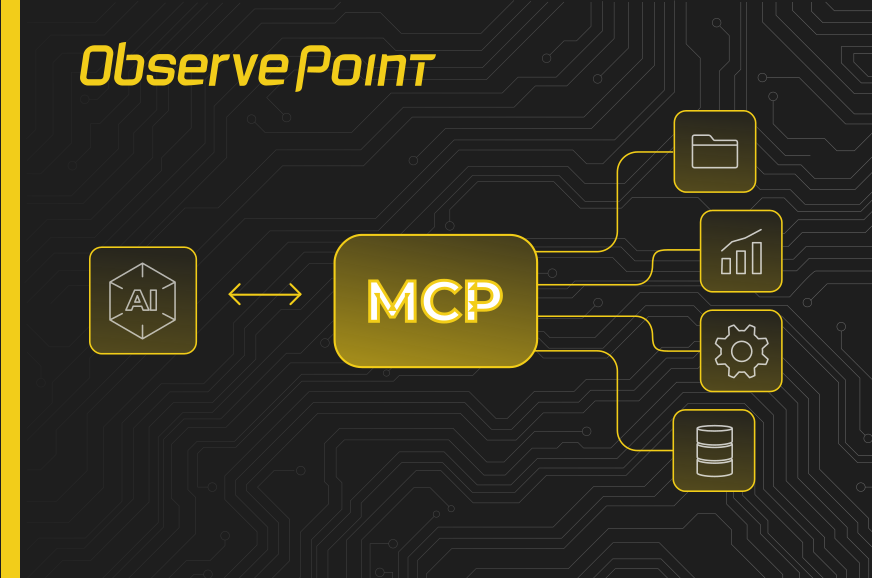
MCP was built to fix that. Most people describe it like a USB-C port for AI, giving assistants and tools a shared connector instead of needing a custom cable for every pairing.
What is MCP?
MCP stands for Model Context Protocol. Anthropic released it as an open-source standard in November 2024, meaning anyone can build to it. It connects AI systems to external tools, data sources, and workflows.
MCP is a shared set of rules that let an AI assistant and a piece of software talk to each other, covering:
- Tools: specific actions an AI assistant is allowed to call, like “create a task” or “run a report”
- Resources: structured data a server can expose for an assistant to read, like a file or a record
- Prompts: reusable prompt templates a server can offer to guide how an assistant uses it
Because that’s standardized, a server built by one company works the same way for any AI assistant that speaks MCP, whether that’s Claude, Copilot, or something else. Since its release, adoption has moved fast. Companies well beyond Anthropic, including OpenAI, now support it, and a growing number of platforms ship their own MCP server so their tools can be reached this way.
What is an MCP Server?
MCP is the protocol, the shared set of rules. An MCP server is the thing that actually implements it.
An MCP server exposes a specific, limited set of actions, usually called “tools,” that an AI assistant can call. Think of it as the specific device you plug into that USB-C port: it speaks the shared protocol, but it only offers the functions it was built to offer. An MCP server built for a project management app might expose tools like “create a task” or “list open tickets.”
An MCP server isn’t a wide-open door into a system. It’s a defined, fixed menu of actions. Just like if you plug a printer into the USB-C port, it will only print things, not microwave dinner.
How MCP Servers Work
MCP’s spec splits the requesting side into two pieces:
- An MCP Host is the AI application itself, like Claude, Copilot, Gemini.
- An MCP Client is a piece built into the MCP Host that manages the connection to a server.
This blog uses “harness” as a catch-all for that Host-and-Client combination, since that’s the term for the app doing the asking.
The server side has its own distinction, local versus remote:
- A Local MCP server runs on your own machine, connecting an assistant to files or tools on the same device
- A remote MCP server runs elsewhere, hosted by whoever built it, and reached over the internet instead of installed. ObservePoint’s MCP server, covered below, is a remote one: there’s nothing to install, since ObservePoint hosts it.
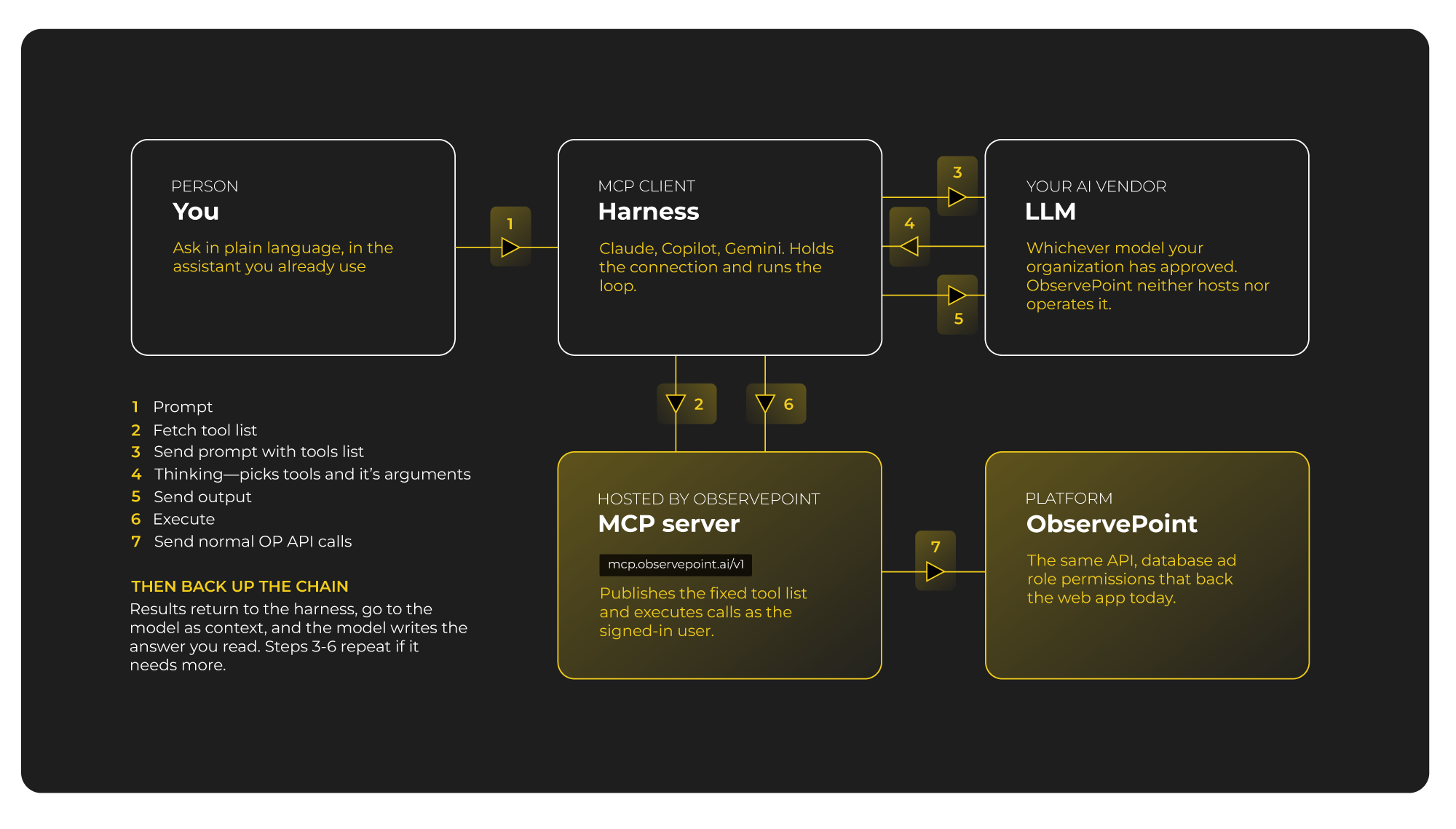
The flow behind an MCP request is pretty simple once you break it down:
- A person sends a prompt to their AI assistant, sometimes called the “harness,” like Claude, Copilot, or Gemini.
- The harness asks the connected MCP server what tools it has available.
- The harness sends the person’s prompt to the LLM, along with that list of available tools.
- The LLM reasons through the request and decides which tool, if any, would answer it.
- The LLM sends that decision back to the harness: call this tool, with these details.
- The harness executes the call against the MCP server.
- The MCP server translates that call into a normal API call against the underlying platform, the same API that already powers that platform’s regular app or integrations, and the result travels back up the chain to the person.
The MCP server’s real job is translation: it takes what the AI assistant is asking for and turns it into something the underlying system already knows how to do.
MCP vs. API
What’s the difference between an API and an MCP? An API is built for developers. Using one well means learning its endpoints, authentication method, and data structure, then writing code to integrate with it. That gives a lot of flexibility, but it takes time to set up and needs ongoing maintenance.
An MCP server is built for an AI assistant instead. It offers a curated, pre-built set of actions that the assistant can call directly, in natural language, without anyone writing custom integration code first. The API is still doing the underlying work: the MCP server just gives an AI a ready-made, AI-friendly way to reach it.
MCP Use Cases and Industries
MCP servers have shown up across a wide range of use cases since the standard’s release.
- Software teams use them to let an AI assistant pull code context, open pull requests, or check build status directly through tools like GitHub.
- Customer support and CRM platforms use them so an assistant can look up a ticket, a customer record, or account history without digging through a dashboard.
- Data and analytics platforms use them for reporting and querying, letting an assistant answer questions like “What happened last week?”
A few real MCP server examples, across a few industries:
- Payments: Stripe built an MCP server so an assistant can check a transaction or issue a refund.
- E-commerce: Shopify’s MCP server gives an assistant access to its store and API documentation.
- Marketing and sales: HubSpot’s MCP server connects an assistant to marketing content, deals, and CRM records.
- Project management: Atlassian made its Rovo MCP server generally available so an assistant can read and write Jira issues and Confluence pages.
MCP Server Risks and Security
Since an MCP server only exposes that defined set of actions, an AI assistant can’t reach into a system’s back end and do whatever it wants. That also means the AI model never touches raw API keys, passwords, or a database connection directly. It only ever calls a tool the server defined, and the server handles those credentials on its own side.
A well-built MCP server also runs every request through the same login and permissions that already govern the underlying platform. If a person can already see certain data or make certain changes by logging in directly, their AI assistant can do the same things through the MCP server.
The bigger question to ask when connecting a new MCP server usually isn’t about the server itself. It’s about which AI vendor sits on the other end of your assistant, since that’s who actually handles data once it leaves the source system. If you want a deeper look at how this plays out for a specific product, ObservePoint’s own security and trust documentation for its MCP server walks through it in detail.
The ObservePoint MCP Server
ObservePoint, a web governance platform, built its own MCP server so customers can get more out of ObservePoint faster.
Instead of clicking through ObservePoint’s Audits, Journeys, Rules, and Reports one screen at a time, a person can connect their existing AI assistant and just ask for what they need. An admin can ask it to build a new privacy Audit, edit a broken Journey, sync consent categories from a CMP like OneTrust, or generate a report, all in plain language. The ObservePoint MCP has 200+ functions, much higher than the average 20+, so it can even help you discover what you need.
That solves a familiar problem. A privacy compliance manager might know exactly what they need to check, like whether cookies are firing before consent, without knowing how to configure the Audit and Rule that would answer it. Historically, that meant filing a request and waiting on the power user who did know how to build it. With the MCP server, the power user is at your fingertips.
As Brigon Abbot, Sr. Manager of Adobe Analytics Tag Management & Governance at Thermo Fisher Scientific, put it:
“That’s going to completely change the game for everybody involved.”
That’s also where it gets more useful. ObservePoint’s MCP server doesn’t work in isolation. Paired with other connected tools, an AI assistant can use ObservePoint to diagnose a problem, then reach into whatever other system actually fixes it. Someone could ask their AI to check a site for accessibility issues and open a pull request against the codebase to address them.
See It In Action
The ObservePoint Tips webinar on the MCP server walks through it live: building a full privacy Audit from a single prompt, fixing broken Journeys, generating reports, and syncing consent categories, all through natural language. It’s a good next stop if you want to see the mechanics above turned into an actual working session.