What Is a Data Layer and Why Do You Need One?
 November 24, 2026


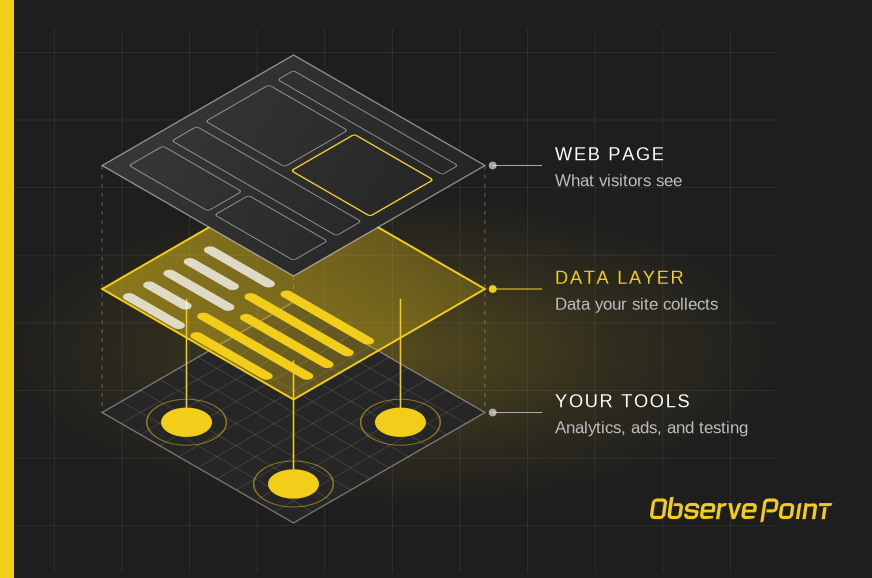

A data layer is a JavaScript object or array on your website that holds the information your analytics and marketing tools need, like the page type, the products someone viewed, and their order total. Instead of each tool hunting for that data on its own, they all read it from the same place.
If your site runs Google Tag Manager, you already have a data layer, because the GTM snippet creates one. But plenty of teams barely use it, and their tags still pull values straight off the page. That works until the page changes.
If you’re new to data layers or want to get more out of the one you have, this guide walks through what a data layer looks like, how analytics tools use it, and how to keep it accurate.
What Is a Data Layer?
A data layer is a JavaScript structure that collects information about a page and what visitors do on it, then makes that information available to your other tools. Your analytics platform, ad pixels, and personalization tools read from it instead of gathering data themselves.
If you don’t write code, think of it as a labeled bin. Your website drops data into the bin (the page name, the product someone viewed, the total of their order), and every tool that needs that data pulls it from the same bin.
Data layers come in two shapes. Older setups often used a single JavaScript object, like the digitalData object proposed in the W3C’s Customer Experience Digital Data draft. Today, Google Tag Manager and the Adobe Client Data Layer both use an array: a list your site adds to over time with a push command. Each push adds a new piece of data or an event, like a purchase or a form submission.
Object or array, it works the same way. A data layer is one shared source of data your other tools can reference.
What a Data Layer Looks Like
Here’s a purchase pushed into the Google Tag Manager data layer, using the ecommerce format Google Analytics 4 expects:
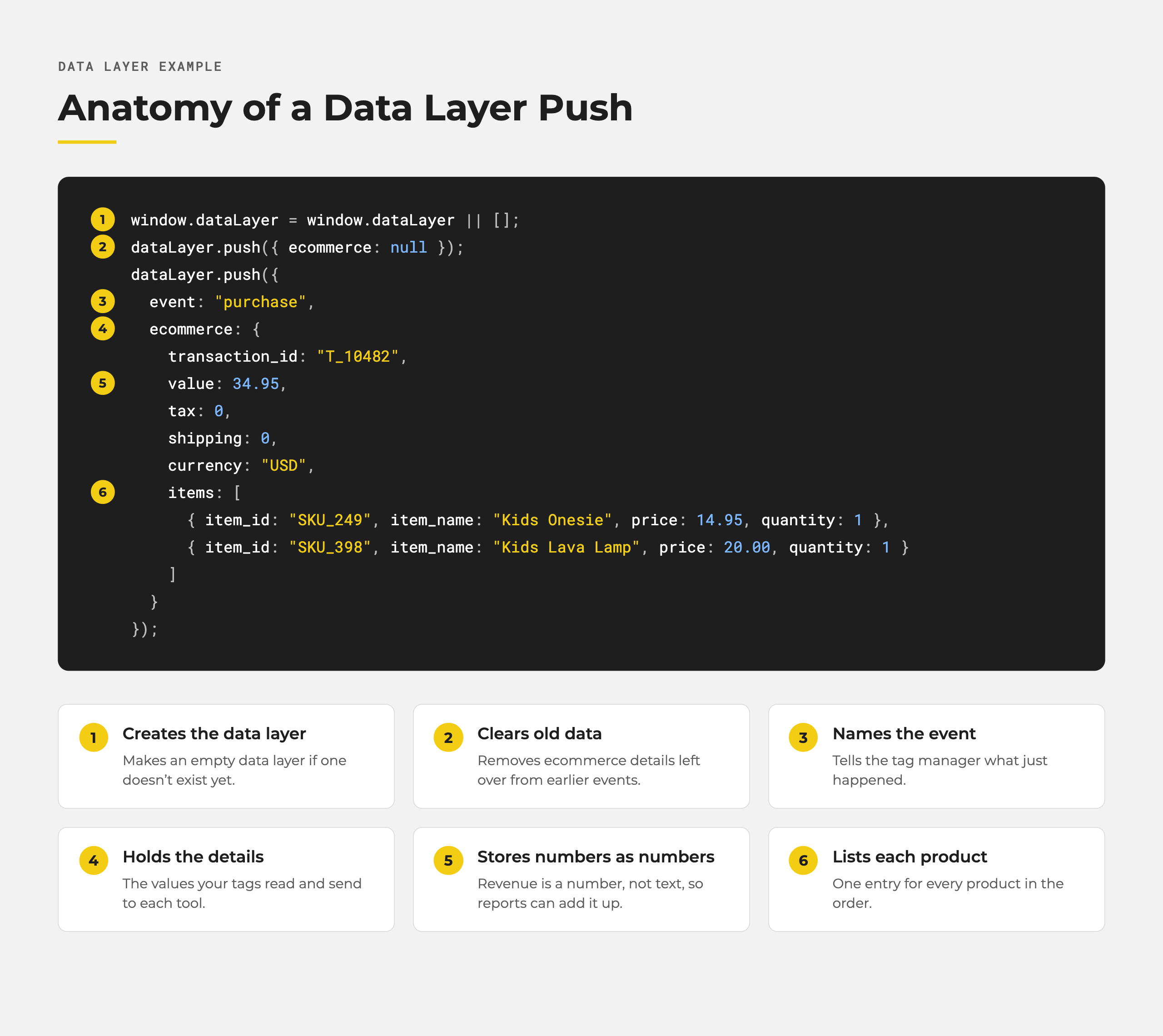
Your tag manager maps each value in the push to the tags that need it. GA4 reads value and currency to report revenue, while an ad pixel might read the same values to count a conversion. The empty push before the purchase matters too: it keeps a product someone viewed earlier from sneaking into this order, a step Google recommends in its ecommerce setup guide.
Your data layer will look different depending on your site, your tag manager, and the tools you use. But the idea stays the same: your site puts the data in, and your tools read it.
Why Use a Data Layer?
A data layer gives every tool the same data, defined the same way, from one place. That makes your tracking more consistent and a lot easier to maintain.
Without one, each vendor collects its own data, which causes three problems:
- You repeat the setup for every tool. Each one needs its own variables declared and filled in, and adding a new vendor means doing it all over again.
- Your numbers stop matching. Each tool defines events a little differently, so your analytics platform and your ad platform can report different counts for the same action.
- Your tracking breaks more often. Vendor code that pulls values straight from the page stops working when the page changes.
A data layer fixes all three. You define each value once, in a format that doesn’t belong to any one vendor, and then tell each tool which value to read. Adding or replacing a vendor becomes a mapping task in your tag manager instead of a new development project.
And because the data comes from your site’s own code instead of the page layout, a redesign is much less likely to wipe out your tracking.
How a Data Layer Works With Web Analytics
Your analytics tool reads the data layer to fill in the reports you rely on: page views, conversions, revenue, and product performance. If the data layer is accurate, those reports are too. If it’s wrong, every tool reading from it is wrong in the same way. (For the bigger picture, see how web analytics and tag management systems work together.)
In Google Tag Manager, a data layer event like purchase can fire a trigger, and data layer variables pass values like transaction_id and value into your GA4 event tag. Google publishes a recommended set of ecommerce events, from view_item_list to purchase, along with the parameters each one expects. Sticking to that format is what makes GA4’s built-in ecommerce reports work.
Adobe works in a similar way. The Adobe Client Data Layer stores data in an array called adobeDataLayer, and rules in Adobe Experience Platform Tags (formerly Adobe Launch) can listen for pushes and read the values:
window.adobeDataLayer = window.adobeDataLayer || [];
window.adobeDataLayer.push({
  event: "purchase",
  transaction: { id: "T_10482", total: 34.95, currency: "USD" }
});
One thing to watch if your site is a single-page app: the page doesn’t reload when someone moves to a new view, so your site needs to push an event every time the route changes. Otherwise your analytics tool can miss those page views entirely.
Data Layer vs. DOM Scraping
DOM scraping copies values off a page’s HTML, while a data layer gets values from your site’s code on purpose. Both can feed your analytics tools. But DOM scraping breaks far more often.
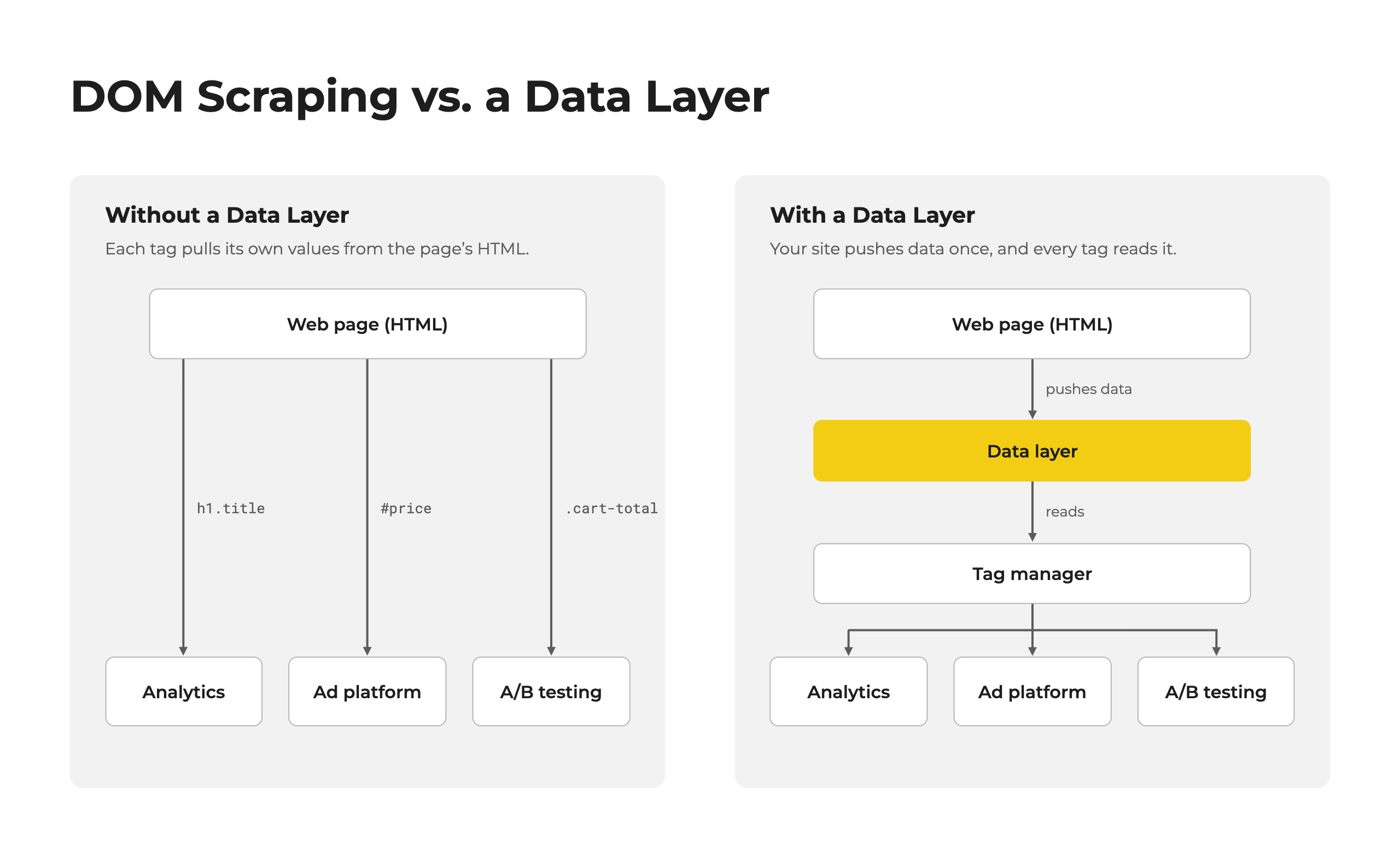
The DOM (Document Object Model) is the browser’s version of a page’s HTML structure. A scraping script uses selectors, like an element’s ID, class, or position on the page, to find a value and copy it into a variable. Here’s a simple example that grabs a product name from a page heading:
<h1 id="product-name">Kids Lava Lamp</h1>const productName = document.getElementById("product-name").textContent;Scraping is handy. If the HTML is well labeled, anyone with basic JavaScript can grab values without waiting on a developer.
But it only works as long as the page stays the same. When a redesign renames that ID or moves the heading, the script comes back empty or grabs the wrong value, and you might not notice until the reports look off.
A data layer avoids that problem because its data doesn’t depend on the page layout. Developers push it as part of the site’s code, so changing how a page looks doesn’t change what’s in the data layer.
How Data Gets Into the Data Layer
Sites fill their data layer in three ways, and most use a mix:
- Hard-coded values. Values that never change on a page, like the site section or page type, get written straight into the page’s data layer code.
- Back-end population. Your CMS or server fills in values while it builds the page, like the product ID and price on a product page.
- Front-end population. JavaScript pushes values when someone does something, like clicking a button or submitting a form.
Here’s a front-end push that fires when someone clicks an “Add to cart” button:
<button id="add-to-cart">Add to cart</button>document.getElementById("add-to-cart").addEventListener("click", function () {
window.dataLayer.push({ event: "add_to_cart_click" });
});This might look like DOM scraping in reverse, since the code still finds the button by its ID. The difference is who owns it. Developers write the push as part of the feature, so if they rename the button, updating the push is part of the same change. Scraping scripts usually live in a tag manager, and the team managing them isn’t always in the loop when developers change the page.
Data Layers, Consent, and Privacy
Your data layer carries more than analytics data. It often carries consent signals too, and sometimes personal information that shouldn’t be there. That makes it a privacy concern as well as an analytics one.
Start with consent. Google’s consent mode passes visitors’ consent choices through the data layer: the gtag('consent', 'default', ...) and gtag('consent', 'update', ...) commands push into the same dataLayer array your tags read. Google’s consent mode setup guide has you set the defaults before any tags send measurement data. If those pushes fire late, in the wrong order, or not at all, your tags can act on the wrong consent state. For example, an ad tag might set cookies before a visitor has accepted them.
Personal data is the second risk. Any script on the page can read the data layer, including every vendor tag. So if a developer pushes a customer’s email address, name, or phone number into it on a checkout or account page, a vendor tag can pick it up and send it to its own servers. Google Analytics policies prohibit sending personally identifiable information like email addresses and phone numbers, and depending on the data and where your visitors live, privacy laws can apply too.
The safest default is to keep personal data out of the data layer. If a tool truly needs it (some ad platforms accept hashed emails for conversion matching, for example), limit it to the pages and tools that require it and check with your privacy team first. Hashing doesn’t always take data out of scope, since hashed data can still count as personal data under some privacy laws.
Data Layer Implementation Checklist
A good data layer takes developers, marketers, analysts, and often your privacy team. Work through these together:
- Agree on a data layer structure and naming conventions.
- Map each value to the business question it answers and the tools that use it.
- Write the code that fills the data layer, using hard-coded, back-end, and front-end methods where each fits.
- Follow your vendors’ formats, like GA4’s recommended ecommerce events.
- Push an event on every route change if your site is a single-page app.
- Set consent defaults before tags fire, and confirm consent updates reach the data layer.
- Keep emails, names, and other personal data out unless there’s a clear, approved reason.
- Remove old vendor-specific DOM scraping once the data layer replaces it.
- Document every variable and keep that documentation current.
- Audit the data layer regularly, especially after releases.
How to Audit Your Data Layer
Even a well-built data layer slowly falls out of sync with your site. A CMS update changes how a value gets filled in, or a developer moves an event push during a redesign, and the tracking that depended on it stops working. Regular audits catch those problems before they reach your reports.
An audit checks that:
- The data layer loads on every page where it should.
- Each variable holds the right kind of value, like a number for revenue instead of text.
- Events fire at the right moment and in the right order, including consent events.
- Your tags read the right values from the data layer.
- No personal data shows up where it shouldn’t.
You can spot-check a few pages in your browser’s developer console. But checking hundreds of pages and every key user flow by hand isn’t realistic, and it has to happen after every release.
ObservePoint’s Analytics Validation scans your pages and user journeys on a schedule, tests your data layer and tags against rules you set, and alerts you when something changes. It can also flag personal data passing to third parties, so privacy problems in the data layer get caught alongside analytics errors.
Want to see how your own data layer holds up? Request a demo for a custom audit of your site.
Data Layer FAQs
Is a Data Layer the Same as Google Tag Manager?
No. Google Tag Manager is a tag management system that decides which tags fire and when. The data layer is the data those tags use. GTM creates a data layer called dataLayer and reads from it, but other tag managers, like Adobe Experience Platform Tags and Tealium, work with data layers too.
Does Every Website Have a Data Layer?
No. A site only has one if someone set it up or a tool created it. The Google Tag Manager snippet creates an empty dataLayer array, but that array only holds useful data if your site pushes data into it.
Can a Data Layer Contain Personal Data?
Yes, and that’s why it needs watching. Every script on the page can read the data layer, so an email address or name pushed into it can end up with any vendor whose tag runs on that page. Keep personal data out unless there’s a clear, approved reason to include it.
Where Does the Data Layer Code Go?
Place the code that sets up your data layer above your tag manager snippet in the page’s code. That way the values are ready when your tags load. Pushes that happen later, like clicks and form submissions, can run anywhere on the page.
What’s the Difference Between a Data Layer and a CDP?
A data layer lives in the visitor’s browser and holds data about the current page and what they do on it. It starts fresh on each page load. A customer data platform (CDP) is separate software that collects data from many sources over time and builds customer profiles. A data layer often feeds a CDP, but it doesn’t replace one.